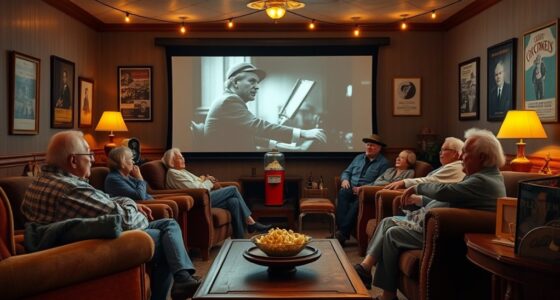
To create a senior-friendly home theater, incorporate assistive technology like closed captioning, audio descriptions, and hearing aid-compatible devices. Design the space with wide, unobstructed pathways, comfortable seating, and soft lighting to guarantee safety and ease of use. Position equipment within reach and control lighting effortlessly for convenience. Combining these accessible features with thoughtful layout ensures everyone, especially seniors, can enjoy movie nights comfortably. Keep exploring to discover more tips for an inclusive movie experience.
Key Takeaways
- Install closed captioning and audio description features to support seniors with hearing and visual impairments.
- Design the space with wide pathways, comfortable seating, and easy-to-reach controls for enhanced accessibility.
- Use high-contrast projectors and adjustable lighting to improve visibility and reduce glare.
- Incorporate hearing aid-compatible audio systems to ensure clear sound for those with hearing difficulties.
- Create a welcoming environment that promotes independence and comfort, encouraging inclusive movie nights for all ages.

Have you ever wished you could bring the movie theater experience right into your living room? Creating a senior-friendly home theater doesn’t have to be complicated. It starts with thoughtful planning that emphasizes assistive technology and accessible design. These elements help guarantee everyone can enjoy the magic of movies comfortably and independently. By integrating assistive tech, you can make the experience more inclusive, allowing seniors with varying needs to participate fully. For instance, consider installing closed captioning options or audio description features, which can substantially enhance understanding and enjoyment for viewers with hearing or visual impairments. Voice-activated controls are also a game-changer—they let users operate the system without needing to navigate complex menus or reach for remote controls, making the setup more user-friendly.
Accessible design goes beyond just technology. Think about the physical layout of your home theater. You want to minimize obstacles and guarantee easy access for everyone, especially seniors who might have mobility limitations. Use wide, unobstructed pathways and ensure seating is comfortable and easy to get in and out of. Elevating seats or providing sturdy armrests can give added support, making it easier for seniors to settle in and enjoy the show. Lighting is another critical factor—install soft, adjustable lights that prevent glare and reduce the risk of falls. These can be controlled through remote or voice commands, maintaining the seamless experience you want to create. Additionally, choosing a projector with high contrast ratio can greatly improve image clarity in various lighting conditions, enhancing the viewing experience for all users.
Sound quality is just as important as visual clarity, especially for those with hearing impairments. Consider investing in a quality sound system or hearing aid-compatible devices that amplify dialogue without overwhelming background noise. This way, every word and sound effect is clear, adding to the immersive experience. The placement of equipment matters too; keep remotes and controls within easy reach, and ensure the layout doesn’t require bending or stretching to operate devices.
Finally, remember that making your home theater senior-friendly isn’t just about equipment—it’s about creating an environment where everyone feels comfortable and included. By combining assistive technology with accessible design principles, you help foster independence, comfort, and enjoyment. This thoughtful approach not only enhances movie nights but also shows your loved ones that their needs are a priority. With a few simple adjustments, you can transform your space into a welcoming, inclusive retreat that everyone will look forward to visiting.
Frequently Asked Questions
How Can I Reduce Glare on the Screen for Seniors?
To reduce glare on the screen for seniors, you should adjust the screen brightness to a comfortable level, avoiding overly bright displays. Use glare reduction techniques like anti-reflective screen filters or matte screens to minimize reflections. Position the screen away from direct light sources and windows, and consider dimming overhead lights or using softer, indirect lighting. These steps help improve visibility and make movie nights more enjoyable for seniors.
What Is the Ideal Distance Between Seniors and the Screen?
You should position seniors about 1.5 to 2.5 times the screen size away, ensuring a comfortable viewing experience. For example, if you have a 60-inch screen, place viewers 7.5 to 12.5 feet back. Keep the viewing angle between 30 to 40 degrees for ideal comfort. This setup minimizes eye strain and provides an immersive experience, making movie nights enjoyable and accessible for seniors.
Are There Specific Sound Settings for Better Hearing Aid Compatibility?
You can improve sound quality by adjusting sound calibration and hearing aid settings. It’s a common myth that standard audio is sufficient; however, personalized calibrations enhance clarity. Make certain your home theater system supports easy volume adjustments and that your hearing aids are set to the appropriate program or noise reduction mode. By tailoring these settings, you ensure seniors enjoy clearer dialogue and a more immersive experience during movie nights.
How Can I Prevent Seniors From Feeling Overwhelmed by Lighting?
You can prevent seniors from feeling overwhelmed by using lighting control and mood lighting. Install dimmable lights or smart lighting systems that allow easy adjustments, creating a soothing environment. Incorporate soft, warm lighting to reduce glare and shadows, making the space more comfortable. Keep lighting levels flexible, so seniors can increase brightness if needed, ensuring they feel relaxed and in control during movie nights.
What Are the Best Seating Options for Seniors With Mobility Issues?
You should choose theater recliners with easy armrest accessibility and sturdy support, ideal for seniors with mobility issues. Look for seats with features like high backs, built-in handles, and smooth recline mechanisms to make sitting down and standing up easier. These options provide comfort and safety, reducing the risk of falls or discomfort, so your loved ones can enjoy movie nights without worry.
Conclusion
Now, imagine settling into your cozy seat, the screen glowing softly before you, sounds wrapping around you like a warm blanket. With a few simple adjustments, your home theater becomes a welcoming oasis where every movie night feels special and accessible. You’ll create a space where laughter, tears, and shared moments come easy—making memories that last. So, turn on the lights, press play, and let your perfect, senior-friendly movie night begin.