To create a disability-friendly home office, focus on ergonomic furniture like adjustable desks and supportive chairs to promote comfort and proper posture. Incorporate assistive devices such as voice recognition or screen readers tailored to your needs. Maximize natural light and add adjustable task lighting to reduce eye strain. Keep your space organized, with essentials within reach, and guarantee clear pathways for mobility. For more ideas on customizing your workspace, explore further tips to make it truly accessible.
Prime for Young Adults — start your free trial
Fast free delivery, streaming and member deals for eligible 18–24 year olds.
As an affiliate, we earn on qualifying purchases.
Key Takeaways
- Incorporate ergonomic furniture like adjustable desks and supportive chairs to promote proper posture and comfort.
- Utilize assistive technology such as voice recognition and screen readers to enhance accessibility.
- Maximize natural light and add adjustable, glare-free lighting to reduce eye strain and improve visibility.
- Arrange items within easy reach and maintain clear pathways to support safe mobility and reduce clutter.
- Personalize and regularly evaluate the workspace to address specific needs and ensure ongoing comfort and accessibility.

Creating an accessible home office guarantees that everyone can work comfortably and efficiently, regardless of mobility or sensory needs. When designing your workspace, prioritizing ergonomic furniture is essential. Choose a desk and chair that support proper posture, reducing strain on your neck, back, and wrists. Adjustable-height desks allow you to switch between sitting and standing, accommodating different comfort levels and physical needs. An ergonomic chair with lumbar support helps maintain spinal alignment, preventing discomfort during long work sessions. These furniture choices not only promote health but also make your workspace adaptable for various mobility requirements. Incorporating proper planning into your design can help anticipate and address potential accessibility challenges early on.
An ergonomic desk and chair support comfort and adaptability for all mobility needs.
In addition to ergonomic furniture, incorporating assistive technology can markedly enhance accessibility. Voice recognition software enables hands-free operation of your device, making it easier to navigate tasks without relying heavily on fine motor skills. Screen readers and magnifiers assist those with visual impairments by reading text aloud or enlarging content for easier viewing. Adaptive keyboards and mice designed for limited dexterity can reduce fatigue and improve control. Integrating these tools ensures that your workspace is inclusive and functional, catering to diverse sensory and motor needs.
Lighting plays a vital role in making your home office accessible. Natural light is ideal, but if that’s limited, consider installing adjustable, glare-free lighting options. Bright, even illumination reduces eye strain and makes it easier to see your work materials. You might also include task lighting at your desk to customize brightness levels and reduce shadows. These lighting adjustments benefit individuals with sensory sensitivities and help create a more comfortable environment overall.
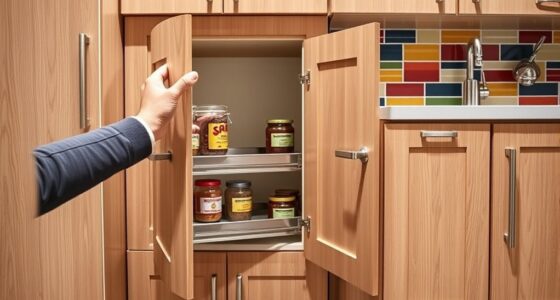
Organization and layout are equally important. Keep frequently used items within easy reach to minimize unnecessary stretching or bending. Use accessible storage solutions, such as open shelves or pull-out drawers, that suit your physical abilities. Clear pathways and a clutter-free space allow for smooth movement, especially if you use mobility aids like walkers or wheelchairs. Proper layout not only increases safety but also helps maintain focus, reducing frustration caused by obstacles.
Finally, don’t forget about personalization. Your workspace should reflect your specific needs and preferences. Regularly evaluate your setup to identify any barriers or discomforts, and adjust accordingly. By combining ergonomic furniture, assistive technology, thoughtful lighting, and smart organization, you create a home office that’s truly inclusive. This thoughtful approach empowers you to work effectively and comfortably, turning your workspace into a place where productivity and accessibility go hand in hand.
adjustable height ergonomic desk
As an affiliate, we earn on qualifying purchases.
As an affiliate, we earn on qualifying purchases.
Frequently Asked Questions
How Do I Choose Ergonomic Equipment for Limited Mobility?
When choosing ergonomic equipment for limited mobility, focus on ergonomic chair selection and adaptive desk setups that suit your needs. You should look for adjustable chairs with supportive features and desks that can be easily modified for seated or standing positions. Consider tools like keyboard trays and voice-activated devices to enhance comfort. Prioritize equipment that promotes independence, reduces strain, and accommodates your specific mobility requirements for a more functional workspace.
What Are the Best Color Schemes for Visual Impairments?
When selecting color schemes for visual impairments, focus on maximizing visual clarity through strong color contrast. Opt for high-contrast combinations like black and white or dark blue and yellow to help distinguish objects easily. Avoid busy patterns and muted tones that can cause confusion. By choosing colors that stand out against each other, you create a more accessible environment that enhances visibility and reduces eye strain, making your workspace more comfortable and functional.
How Can I Improve Acoustics for Hearing Impairments?
To improve acoustics for hearing impairments, you should focus on soundproofing materials and strategic acoustic panel placement. Add soundproofing panels or heavy curtains to reduce noise and echo. Place acoustic panels at ear level and along walls where sound reflects. This minimizes background noise and enhances clarity, helping you focus better. Proper acoustic design creates a more comfortable workspace, ensuring you can concentrate without distractions.
What Safety Features Are Essential for Wheelchair Users?
You should prioritize safety features like clear fire escape routes and accessible emergency alert systems. Make certain pathways are wide enough for your wheelchair and free of obstructions. Install visual and audible alarms to alert you during emergencies. Position fire extinguishers at reachable heights, and consider adding grab bars near exits. Regularly test emergency systems and keep escape routes well-lit, so you can evacuate quickly and safely when needed.
How Do I Adapt Technology for Cognitive Disabilities?
Think of adapting technology for cognitive disabilities as guiding a lighthouse through fog. You can do this by installing user-friendly assistive software and cognitive aids that simplify tasks and improve focus. Choose tools with clear interfaces, customizable settings, and voice commands. This helps you stay organized and efficient, ensuring your workspace is accessible. With the right tech, you’ll navigate your workday smoothly, turning challenges into pathways for success.
Conclusion
Creating an accessible home office isn’t just about meeting standards—it’s about making your workspace truly work for you. When you prioritize comfort, flexibility, and thoughtful design, you set yourself up for success. Remember, a well-planned space can turn challenges into opportunities, proving that with a little effort, you can turn the tide in your favor. Keep your needs front and center, and watch your productivity flourish in a setting that feels just right.
NFL season / tailgating Picks
team gear
As an affiliate, we earn on qualifying purchases.