The most common mistake that shrinks your viewing experience is improper projector placement, especially placing it too close or too far from the screen. If you don’t match the throw distance to your projector’s specifications, images can become blurry, stretched, or too small, ruining the immersion. Misalignment and incorrect height also cause keystone distortion, making images look trapezoidal and less engaging. To avoid this, make certain your projector is correctly positioned according to the manufacturer’s guidelines—keep exploring to learn more about optimizing your setup.

Get furniture and decor delivered free — and shop member deals
- Fast, free delivery on millions of items
- Access to Prime Big Deal Days deals on October 6–7
- Prime Video, Amazon Music and more included
Key Takeaways
- Placing the projector too close or too far from the screen causes improper image sizing and distorts the viewing experience.
- Ignoring the projector’s throw ratio results in images that are either too small or oversized, shrinking the perceived screen.
- Incorrect height or angle leads to keystone distortion, reducing effective screen size and clarity.
- Failing to measure and match throw distance to screen size causes images to be cramped or underwhelming.
- Poor alignment or improper mounting prevents a straight, proportioned image, diminishing immersion.

Have you ever set up a projector only to realize the image is distorted or difficult to see? It’s a frustrating experience, especially when you’re excited to enjoy your home theater. One common mistake that causes this issue is improper projector placement, which directly impacts your screen size and overall viewing quality. When you place your projector too close or too far from the screen, the image can become blurry, stretched, or too small—shrinking the immersive experience you’re after. To get the best picture, you need to understand the importance of positioning your projector correctly relative to your screen size.
Many people underestimate how critical projector placement is to creating a true home theater environment. The key is to match the projector’s throw distance—the space between the projector and the screen—with the size of your screen. If you set it up too close, the image might be cut off or overly large, causing distortion and making it hard to see details clearly. Conversely, placing it too far away results in a tiny image that doesn’t fill your screen, diminishing the sense of immersion. This incorrect placement can make your viewing experience feel cramped or underwhelming, as the image doesn’t utilize the full potential of your screen size. Additionally, understanding projection calculations can help you predict the ideal setup based on your room dimensions and desired screen size.
Another mistake is ignoring the recommended throw ratio of your projector. Every projector comes with a specific throw ratio, which guides how far back you need to position it to achieve a certain screen size. Ignoring these guidelines often leads to a distorted picture or a setup that doesn’t maximize your home theater’s potential. For example, if your projector’s throw ratio indicates it should be placed 10 feet away to produce a 100-inch screen, but you set it 5 feet, the image will be oversized and distorted. On the other hand, setting it 20 feet away when it only needs half that distance results in an undersized picture.
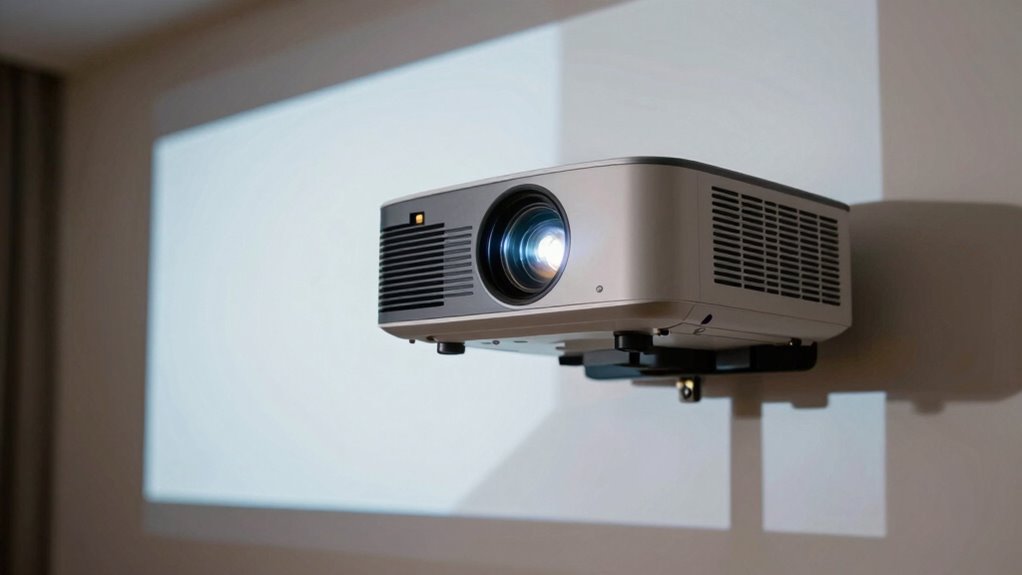
Proper placement also means considering the height and angle of your projector. If it’s not aligned properly with the center of your screen, you might end up with keystone distortion—where the image appears trapezoidal instead of rectangular. This distortion not only shrinks the effective screen size but also makes viewing uncomfortable. To avoid this, you should mount or position your projector at the correct height and angle, ensuring a straight, aligned image. Additionally, understanding the throw distance and how it affects your image size is crucial for a seamless setup. A clear understanding of projection calculations can further assist in fine-tuning your setup for the best possible picture. Being aware of alignment techniques can also help you prevent common setup pitfalls and achieve optimal image quality.
In short, to prevent your viewing experience from shrinking, you need to pay attention to your projector’s placement relative to your screen size. Measure the throw distance carefully, follow the manufacturer’s recommendations, and adjust your setup accordingly. Doing so will help you enjoy a crisp, properly proportioned picture that truly transforms your space into an immersive home theater.
projector mount with adjustable throw distance
As an affiliate, we earn on qualifying purchases.
As an affiliate, we earn on qualifying purchases.
Frequently Asked Questions
How Does Projector Size Affect Placement Options?
Your projector size directly impacts placement options because larger projectors require more projection distance to cover the screen properly, which can limit where you position it. Smaller projectors offer greater flexibility, allowing you to choose ideal projection distance without sacrificing image quality. When selecting your projector, consider the screen size you want and make certain your chosen projector size aligns with your room’s space, so you get the best viewing experience.
What Are the Best Wall Colors for Projector Projection?
You might be surprised, but the best wall colors for projector projection are matte, neutral shades like light gray or beige. These minimize reflections and enhance contrast. Keep in mind, wall texture matters too—smooth surfaces help with accurate projector calibration, avoiding distortions. Avoid glossy or dark walls, as they can absorb or scatter light, reducing image clarity. Choosing the right wall color and texture makes your viewing experience sharp and immersive.
Can Room Lighting Impact Projector Image Quality?
Yes, room lighting considerably impacts your projector image quality. Excess ambient lighting can wash out the image, making it hard to see details. To improve viewing, reduce ambient lighting where possible and use curtains or dimmable lights. Additionally, managing glare and reflections helps prevent image distortion. Proper lighting control enhances contrast, brightness, and overall clarity, giving you a better viewing experience and making your projector images sharper and more vivid.
How Often Should I Calibrate My Projector?
You should calibrate your projector every 3 to 6 months to maintain ideal viewing experience. Studies show that even small shifts in brightness and color accuracy can reduce image quality by up to 20%. Regular projector calibration ensures you get the best possible picture, preventing dullness or color distortions. Keep your calibration routine consistent, especially if you use your projector frequently, to enjoy sharp, vibrant images every time.
Are There Portable Projectors Suitable for Small Spaces?
Yes, there are portable projectors suitable for small spaces. Look for models with a compact design, making them easy to move and fit into tight areas. Portable options often include built-in batteries, wireless connectivity, and small form factors, perfect for quick setups. These projectors provide flexibility and convenience, allowing you to enjoy big-screen entertainment without taking up much room. Just guarantee they deliver enough brightness for your space.
Conclusion
To truly enjoy your home theater, avoid placing the projector too close or off-center, which can distort the picture and shrink your viewing experience. Imagine how much more immersive it would feel if the image is perfectly aligned and sized correctly—like stepping into a movie theater. With careful placement, you’ll enjoy crisp, vibrant visuals that fill your screen and captivate everyone. Don’t let poor positioning limit your movie nights—get it right, and you’ll never want to watch anywhere else.
Fall Picks
fall essentials
As an affiliate, we earn on qualifying purchases.