A home monitoring system for elderly people can mean a wearable medical alert, a simple call button, a bed alarm, or a camera that helps family check in. My best overall pick is the Nomo Medical Alert System with Fall Detection for shoppers prioritizing emergency response, while the Lunderg Bed Alarm stands out for bed-exit alerts and JubileeTV for remote family communication. The main tradeoff is between a system built to summon help and one that helps a caregiver observe or communicate; those functions are not interchangeable. Connectivity, alert range, setup, privacy, and who responds to an alarm also shape the right choice. Read on for the full breakdown of all 13 options and how I’d match them to different care needs.

Get furniture and decor delivered free with Prime
- Fast, free delivery on millions of items
- Prime Video, Amazon Music and more included
- Member-only deals all year
Complete the kit


Key Takeaways
- The lineup serves different jobs: Nomo is the medical-alert-oriented option, while pagers, cameras, bed alarms, and intercoms cover distinct parts of at-home care.
- Fall detection is not the same as fall prevention: Nomo focuses on alerting after a possible fall, while Lunderg is designed to notify a caregiver when someone gets out of bed.
- Simple call buttons favor direct caregiver response: The caregiver pager and CallToU pager models make sense when a nearby person can hear and answer an alert.
- Remote communication brings added complexity: JubileeTV and camera-based picks offer ways to check in from afar, but depend more on connectivity, app setup, and comfort with video.
- Several products overlap heavily: CallToU appears across pager and intercom formats, so buyers should choose by alert method and caregiver location rather than brand name alone.
| Caregiver Pager with 2 Wireless Call Buttons for Home Care |  | Best for Two Call Points | Power source: Battery powered | Batteries: 4 AA batteries required; included | Maximum range: 500 feet | VIEW ON AMAZON | See Our Full Breakdown |
| Nomo Medical Alert System with Fall Detection for Seniors |  | Best for Remote Emergency Response | Components: Smart Hub, two Satellite range extenders, and wearable Tags | Connectivity: Wi-Fi; no landline required | Fall detection: Included | VIEW ON AMAZON | See Our Full Breakdown |
| CallToU Wi-Fi Caregiver Call Button Emergency Alert System for Seniors |  | Best for Shared Smartphone Alerts | Power source: 2 AAA alkaline batteries; included | Compatible devices: Smartphone and tablet | Maximum range: 328 feet | VIEW ON AMAZON | See Our Full Breakdown |
| Lunderg Wireless Early Alert Bed Alarm System for Elderly & Fall Prevention |  | Best for Bed-Exit Fall Prevention | Power source: Battery powered | Batteries: 2 AA batteries required | Maximum range: 400 feet | VIEW ON AMAZON | See Our Full Breakdown |
| Wireless Battery-Powered Caregiver Pager System with Call Button |  | Best Simple Single-Button Pager | Power source: 2 AA batteries required; included | Maximum range: 150 meters | Control method: Touch | VIEW ON AMAZON | See Our Full Breakdown |
| JubileeTV Remote Care System for Seniors — Control TV Remotely from Your Phone, Video Calls, Reminders & Monitoring |  | Best for Remote Family Support | Connectivity: Bluetooth, infrared, and Wi-Fi | Supported devices: Up to 4 | Compatible equipment: DVD/Blu-ray player, set-top box, streaming device, and television | VIEW ON AMAZON | See Our Full Breakdown |
| CallToU Caregiver Pager with 2 Wireless Call Buttons for Elderly at Home |  | Best for Simple Whole-Home Alerts | Package contents: 2 call buttons and 2 receivers | Maximum range: 500 feet through walls, as stated | Volume: 5 levels, up to 110 dB | VIEW ON AMAZON | See Our Full Breakdown |
| myQ Indoor Plug-in Security Camera Gen 2 – 2K Smart Wi‑Fi Camera with Night Vision, Baby and Pet Monitor, Motion Detection and Alerts, 2-Way Audio & App Control |  | Best for Clear App-Based Room Monitoring | Video resolution: 2K | Field of view: 130 degrees | Night vision: Yes | VIEW ON AMAZON | See Our Full Breakdown |
| CallToU Baby Monitor for Elderly with Camera and Audio |  | Best for Monitoring Without Wi-Fi | Connection: 2.4GHz FHSS wireless | Video resolution: 720p | Screen size: 2.8 inches | VIEW ON AMAZON | See Our Full Breakdown |
| Home Security Camera with 4.3-inch Screen, 1080P HD, Two-Way Video Call, Motion Detection |  | Best for a Built-In Video Call Screen | Screen size: 4.3 inches | Resolution: 1080P HD | Connectivity: 2.4GHz Wi-Fi | VIEW ON AMAZON | See Our Full Breakdown |
| PILSAMAS WiFi Smart Caregiver Pager, 1 Receiver, 2 Call Buttons & Wristband |  | Best for Customizable Room-to-Room Alerts | Included alert devices: 2 call buttons and 1 wristband | Receiver count: 1 | Connectivity: Wi-Fi and 433MHz | VIEW ON AMAZON | See Our Full Breakdown |
| CallToU Caregiver Pager Wireless Alert Button Home Wireless Intercom System | 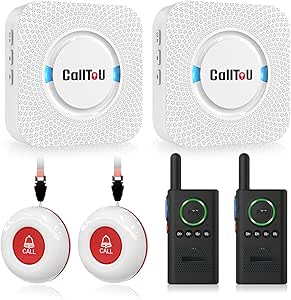 | Best for Multi-Room Caregiver Coverage | Included equipment: 2 call buttons, 2 receivers, and 2 walkie-talkies | Maximum range: 500 feet | Power source: Battery powered; receivers require electrical outlets | VIEW ON AMAZON | See Our Full Breakdown |
| CallToU 2-Way Wireless Intercom System for Elderly Monitoring |  | Best for Large Properties Without Wi-Fi | Maximum talking range: 3,300 feet | Channels: 16 | Connectivity protocol: UHF | VIEW ON AMAZON | See Our Full Breakdown |
| home monitoring system for elderly | Maximum range |
|---|---|
| Caregiver Pager with 2 Wireles | 500 feet |
| Nomo Medical Alert System with | — |
| CallToU Wi-Fi Caregiver Call B | 328 feet |
| Lunderg Wireless Early Alert B | 400 feet |
| Wireless Battery-Powered Careg | 150 meters |
| JubileeTV Remote Care System f | 10 meters |
| CallToU Caregiver Pager with 2 | 500 feet through walls, as stated |
| myQ Indoor Plug-in Security Ca | — |
| CallToU Baby Monitor for Elder | — |
| Home Security Camera with 4.3- | — |
| PILSAMAS WiFi Smart Caregiver | — |
| CallToU Caregiver Pager Wirele | 500 feet |
| CallToU 2-Way Wireless Interco | — |
More Details on Our Top Picks
Caregiver Pager with 2 Wireless Call Buttons for Home Care
I’d choose this pager when a household needs two simple ways to call for help without adding an app or monitoring subscription. Its two wireless buttons let a senior signal from separate rooms, while the receiver can alert a caregiver within a stated 500-foot range. Compared with the single-button SYNLETT pager, this set covers more locations out of the box; the Lunderg bed alarm is a better fit when the specific concern is getting out of bed before a caregiver can respond.
The tradeoff is its simplicity: it sends an alert but does not provide fall detection, two-way voice, or remote app notifications. I’d also plan for battery replacements and check that the receiver’s sound can be heard where the caregiver spends time. It suits households that want a straightforward call system, not continuous monitoring.
Pros:- Includes two call buttons for separate locations
- Stated wireless range of up to 500 feet
- Adjustable alert sounds and multiple mounting options
- Simple touch operation with batteries included
Cons:- Provides basic call alerts rather than fall detection or two-way communication
- Battery-powered components need replacement batteries over time
Best for: Families who want call buttons in two rooms and a nearby caregiver who can respond to an audible pager.
Not ideal for: Households seeking automatic fall detection, voice communication, or alerts sent to a caregiver away from home.
- Power source:Battery powered
- Batteries:4 AA batteries required; included
- Maximum range:500 feet
- Number of call buttons:2
- Number of receivers:1
- Audible noise:90 dB
- Control method:Touch
- Warranty:1 year
Our verdict“Choose this set if two easy-to-reach call buttons matter more than app alerts or automatic fall detection.”
Nomo Medical Alert System with Fall Detection for Seniors
Among these five options, Nomo is the clearest fit for families who need more than a button that rings inside the home. Its wearable tags, fall detection, two-way voice, and 24/7 monitoring option bring emergency response into the system, while the Smart Hub and two range extenders are designed to cover the home without a landline. Compared with the Caregiver Pager with 2 Wireless Call Buttons, it can do more when a senior cannot press a button or when family members are not nearby.
That broader safety net comes with dependencies: monitoring requires a subscription after the trial, and the system relies on Wi-Fi. The supplied information also gives no battery-life details for the wearable tags, which families should clarify before relying on them day and night. I’d pick Nomo for supported independent living, not for someone who only needs a basic in-home alert.
Pros:- Fall detection and emergency alerts add protection beyond a manual call button
- Two-way voice allows direct communication through the system
- Smart Hub, two range extenders, and wearable tags are included
- Plug-and-play setup does not require a landline or wiring
Cons:- 24/7 monitoring requires a subscription after the trial period
- Operation depends on a stable Wi-Fi connection
- Battery-life details for wearable tags are not provided
Best for: Families supporting a senior living independently who want fall detection, two-way contact, and an available monitoring service.
Not ideal for: Buyers who want a subscription-free, Wi-Fi-independent alert system or need confirmed wearable battery-life details.
- Components:Smart Hub, two Satellite range extenders, and wearable Tags
- Connectivity:Wi-Fi; no landline required
- Fall detection:Included
- Communication:Two-way voice
- Emergency monitoring:24/7 monitoring with optional subscription
- Setup:Plug-and-play; no wiring needed
Our verdict“Choose Nomo if remote monitoring and fall detection justify the subscription and Wi-Fi dependence.”
CallToU Wi-Fi Caregiver Call Button Emergency Alert System for Seniors
I’d put this CallToU ahead of a basic pager when several family members need to receive alerts on their phones. It combines a call button, app notifications, and support for multiple users, with customizable ringtones and five volume levels for tailoring local alerts. Compared with the two-button B09SPSK3V6 system, its phone-based notifications can reach caregivers beyond the room, though it has a shorter stated range of 328 feet rather than 500 feet.
Its app connection also creates more setup requirements: it supports 2.4G Wi-Fi, not 5G, and additional notification features may require a subscription. The product description mentions fall detection and monitoring functions, but the supplied specifications do not clarify how these work, so I would not treat it as equivalent to Nomo’s described 24/7 emergency monitoring. It makes sense for connected households, not anyone seeking a fully specified medical-response service.
Pros:- App notifications can alert multiple users
- Twenty ringtone options and five volume levels allow alert customization
- Stated wireless range of up to 328 feet
- Smartphone and tablet compatibility
Cons:- Requires 2.4G Wi-Fi and does not support 5G Wi-Fi
- Additional notification features may require a subscription
- Battery-life and fall-monitoring details are limited
Best for: Families with multiple caregivers who want smartphone notifications and customizable alerts over a 2.4G Wi-Fi network.
Not ideal for: Households using only 5G Wi-Fi or buyers who need clearly specified, subscription-free fall monitoring.
- Power source:2 AAA alkaline batteries; included
- Compatible devices:Smartphone and tablet
- Maximum range:328 feet
- Sensor technology:RF sensor
- Number of ringtones:20
- Volume levels:5
- Control method:App
- Wi-Fi band:2.4G Wi-Fi; not 5G
Our verdict“Choose this CallToU system if multiple caregivers need phone alerts and the home has compatible 2.4G Wi-Fi.”
Lunderg Wireless Early Alert Bed Alarm System for Elderly & Fall Prevention
For a senior at risk of falling while getting out of bed, I’d favor Lunderg over a general call pager because its pre-rise sensor is designed to alert a caregiver before the person stands. The pressure pad sits at hip level, and the portable pager can notify a caregiver within a stated 400-foot range without Wi-Fi or an app. That makes it more targeted than the Caregiver Pager with 2 Wireless Call Buttons, which waits for the senior to press a button.
This is a focused bed-monitoring tool rather than a whole-home system: it does not provide remote app alerts or two-way communication, and it is compatible with specified Lunderg devices rather than being universal. Its appeal is also the quieter approach: the alert goes to the caregiver rather than using a loud in-room alarm. I’d choose it for bed-exit supervision, but pair it with another call method for needs outside the bed.
Pros:- Pre-rise sensing can alert caregivers before a person gets out of bed
- Pager alerts avoid a loud alarm in the senior’s room
- Works without Wi-Fi or an app
- Portable pager has a stated range of up to 400 feet
Cons:- Focused on bed-exit monitoring rather than general household calls
- No app integration or remote smartphone alerts
- Compatibility is limited to specified Lunderg devices
Best for: Caregivers supervising a senior with dementia or fall risk who needs monitoring during bed exits without a loud bedside alarm.
Not ideal for: Families needing whole-home coverage, app-based remote alerts, or compatibility with non-Lunderg devices.
- Power source:Battery powered
- Batteries:2 AA batteries required
- Maximum range:400 feet
- Sensor technology:Lunderg Pre-Alert Smart Sensor Technology
- Audible noise:120 dB
- Mounting type:Wall mount
- Compatible devices:Lunderg Bed Alarm, Chair Alarm, and Call Button
- Item weight:0.74 kg
Our verdict“Choose Lunderg when preventing unsupervised bed exits is the main safety need, rather than general home communication.”
Wireless Battery-Powered Caregiver Pager System with Call Button
This SYNLETT set is the most stripped-back choice here: one call button and one pager let a senior request help without using a phone, Wi-Fi, or a subscription. Its stated range is 150 meters (about 500 feet), and the included lanyard, adhesive tape, and mounting screws give caregivers several ways to place the button within reach. Compared with the Caregiver Pager with 2 Wireless Call Buttons, this model covers fewer locations, but its single-button setup suits a bedroom or other specific call point.
The tradeoff is that it offers manual alerts only. Unlike Lunderg, it does not detect someone getting out of bed, and the supplied details do not specify app notifications or two-way voice. Range can also fall when walls or other obstacles intervene. I’d choose it for a senior who can reliably press a button and a caregiver who stays within pager range, not for remote oversight or fall detection.
Pros:- Simple touch-operated call button and pager
- Stated range of up to 150 meters, or about 500 feet
- Includes a lanyard, adhesive tape, and mounting screws
- Batteries are included
Cons:- Only one call button is included
- Range may be reduced by walls and other obstructions
- Provides no stated fall detection or app-based remote monitoring
Best for: Caregivers who need one straightforward, battery-powered call point for a senior in a bedroom or small care setting.
Not ideal for: Families needing multiple call locations, automatic bed-exit or fall detection, or alerts sent to a phone outside the home.
- Power source:2 AA batteries required; included
- Maximum range:150 meters
- Control method:Touch
- Mounting type:Wall mount
- Sensor technology:Contact sensor
- Included accessories:Lanyard, 2 AA batteries, 23A 12V battery, adhesive tape, mounting screws, and user manual
- Item weight:0.19 kg
- Model number:D091G
Our verdict“Choose this SYNLETT pager for one dependable, easy-to-place call point when basic alerts are enough.”
JubileeTV Remote Care System for Seniors — Control TV Remotely from Your Phone, Video Calls, Reminders & Monitoring
I’d choose JubileeTV when a senior’s television is already part of their daily routine and family members want a way to check in beyond a simple alert button. Its large, backlit voice remote is designed to reduce the hassle of juggling TV controls, while remote access, video calls, and reminders add ways to stay connected. Compared with the CallToU Caregiver Pager, which is focused on summoning nearby help, JubileeTV offers a broader communication and routine-support role—but it is not a substitute for an emergency response system. It can work with several types of TV equipment, though setup depends on an HDMI-equipped TV and Wi-Fi. The biggest tradeoff is ongoing membership for full features, alongside U.S.-only availability.
Pros:- Large backlit remote with voice control is designed to make TV operation more accessible.
- Smartphone access lets family members control the TV remotely.
- Video calls and reminders add communication and routine support.
- Supports up to four compatible devices, including TVs and streaming equipment.
Cons:- Full features require an active membership.
- Requires a TV with HDMI and a Wi-Fi connection.
- Available only in the U.S.
Best for: Families in the U.S. supporting a senior who regularly uses a compatible TV and would benefit from remote check-ins and reminders.
Not ideal for: Households seeking a simple emergency call button, lacking reliable Wi-Fi or an HDMI-equipped TV, or unwilling to pay for a membership.
- Connectivity:Bluetooth, infrared, and Wi-Fi
- Supported devices:Up to 4
- Compatible equipment:DVD/Blu-ray player, set-top box, streaming device, and television
- Controller:Voice control
- Remote buttons:34
- Maximum range:10 meters
- Batteries:2 AAA batteries required
Our verdict“Choose JubileeTV for TV-centered remote support and family check-ins, not as a replacement for a dedicated emergency pager.”
CallToU Caregiver Pager with 2 Wireless Call Buttons for Elderly at Home
For a senior who needs a straightforward way to call someone nearby, I’d rank the CallToU pager ahead of camera-based options such as the myQ Indoor Camera. Two call buttons and two plug-in receivers create a basic alert network across the home, while the stated 500-foot range through walls can help caregivers hear a call from another room. The volume adjusts up to 110 dB, and the buttons can be worn or mounted, so the system can suit different rooms and routines. Its simplicity is also its limit: it does not provide video, remote family check-ins, or automatic fall detection. Receivers need wall outlets, and the buttons run on replaceable batteries. I’d treat it as a call-for-help tool, not a complete monitoring system.
Pros:- Includes two call buttons and two receivers for alert coverage in multiple rooms.
- Long stated wireless range can carry alerts through walls.
- Adjustable volume reaches up to 110 dB.
- Waterproof and dustproof buttons can be worn or placed in varied locations.
Cons:- Receivers must remain plugged into AC outlets.
- Call buttons require battery replacement over time.
- A button press only alerts someone who can hear and respond to a receiver.
Best for: Households where a senior can press a button and a caregiver is nearby to respond to an audible alert.
Not ideal for: Families who need remote monitoring, automatic fall alerts, or a wearable receiver that works away from an outlet.
- Package contents:2 call buttons and 2 receivers
- Maximum range:500 feet through walls, as stated
- Volume:5 levels, up to 110 dB
- Ringtones:55 selectable tones
- Receiver power:Plug-in AC outlet
- Call button batteries:2 x 12 V alkaline batteries included
- Mounting and wear options:Tabletop, neck strap, or bracket
- Waterproof/dustproof:Yes
Our verdict“Pick this pager when a nearby caregiver needs a loud, uncomplicated alert system rather than video or internet-based monitoring.”
myQ Indoor Plug-in Security Camera Gen 2 – 2K Smart Wi‑Fi Camera with Night Vision, Baby and Pet Monitor, Motion Detection and Alerts, 2-Way Audio & App Control
I’d pick the myQ Indoor Camera for families who want a clear view of a particular room and are comfortable checking it through an app. Its 2K video, 130-degree view, and night vision support visual check-ins across a wider area than the small-screen CallToU Baby Monitor, while two-way audio lets a caregiver speak through the camera. Person-versus-pet detection may help cut unnecessary motion alerts, though the supplied information does not establish medical or fall detection. Setup uses Bluetooth and Wi-Fi, and the tabletop mount avoids tool-based installation. The compromises are meaningful for elder care: it is corded and indoor-only, and advanced alerts require a subscription. This is a room-monitoring camera, not a wearable alert or a private, internet-free monitor.
Pros:- 2K resolution and night vision support detailed room check-ins.
- 130-degree field of view covers a broad indoor area.
- Two-way audio allows direct verbal check-ins.
- Bluetooth setup and tabletop mounting simplify placement.
Cons:- Advanced smart alerts require a subscription.
- Corded power limits placement and portability.
- Indoor-only and dependent on Wi-Fi; it is not a dedicated emergency alert device.
Best for: Caregivers who want app-based visual check-ins and two-way conversation in a room with dependable Wi-Fi and a nearby outlet.
Not ideal for: Families who need internet-free monitoring, a portable device, or advanced alerts without a subscription.
- Video resolution:2K
- Field of view:130 degrees
- Night vision:Yes
- Audio:Two-way
- Connectivity:Bluetooth and Wi-Fi
- Power:Corded electric
- Mount:Tabletop
- Dimensions:2.64 x 2.64 x 3.8 inches
Our verdict“Choose myQ for app-based visual monitoring in a fixed room, but look elsewhere for emergency calling or offline operation.”
CallToU Baby Monitor for Elderly with Camera and Audio
The CallToU monitor suits households that want video and voice check-ins without adding a camera to the home Wi-Fi network. Its private 2.4GHz FHSS connection links the camera to a 2.8-inch screen, making it a more self-contained option than the app-dependent myQ Indoor Camera. Two-way audio, night vision, an SOS button, and medication and room-comfort reminders give it a broader care focus than a basic camera. The stated range reaches 660 feet in open areas, but walls and obstacles can reduce coverage. The camera’s pan and tilt are manual rather than remote, so a caregiver cannot adjust the view from the monitor. I’d choose it for local, in-home supervision—not remote monitoring from outside the home.
Pros:- Private FHSS connection operates without Wi-Fi, a router, or internet.
- Live video, night vision, and two-way audio support in-home check-ins.
- SOS button and medication and comfort reminders add care-focused functions.
- Long stated open-area range supports movement around the home.
Cons:- Camera pan and tilt must be adjusted manually.
- Actual range can fall when walls or other obstacles intervene.
- SOS and help functions depend on someone manually pressing the button.
Best for: Caregivers who want a dedicated screen, two-way audio, and reminders without Wi-Fi or internet setup.
Not ideal for: Families who need remote access from outside the home, app control, or camera repositioning from the monitor.
- Connection:2.4GHz FHSS wireless
- Video resolution:720p
- Screen size:2.8 inches
- Range:Up to 660 feet / 200 m in open areas
- Zoom:2x and 4x digital
- Audio:Two-way
- Camera adjustment:Manual pan up to 355° horizontal and 90° vertical
- Care features:SOS button, medication and room-comfort reminders, temperature display and alert
Our verdict“Choose this model for local video monitoring and care reminders without Wi-Fi, provided manual camera adjustment is acceptable.”
Home Security Camera with 4.3-inch Screen, 1080P HD, Two-Way Video Call, Motion Detection
This camera is a fit for families who want a dedicated screen and device-to-device calling in one indoor unit, rather than relying entirely on a phone app. Its 4.3-inch display and 1080P video offer a larger built-in viewing surface than the CallToU Baby Monitor’s 2.8-inch screen, and motion detection and night vision support routine room checks. The screen and calling functions may make two-way contact more direct, but the product details do not specify how calls are initiated or whether the display can be used without Wi-Fi. It requires 2.4GHz Wi-Fi, works indoors only, and does not include an SD card. Compared with JubileeTV, it focuses on camera-based communication rather than TV control, reminders, and remote TV management.
Pros:- Built-in 4.3-inch screen provides a dedicated viewing surface.
- 1080P video supports clear indoor check-ins.
- Two-way video calling supports direct communication.
- Motion detection and night vision add monitoring functions.
Cons:- Supports 2.4GHz Wi-Fi only, not 5GHz networks.
- SD card storage is not included.
- Indoor-only use limits placement and coverage.
Best for: Families seeking an indoor camera with its own screen for video check-ins and access to a 2.4GHz Wi-Fi network.
Not ideal for: Households using only 5GHz Wi-Fi, needing outdoor coverage, or expecting local recording without supplying an SD card.
- Screen size:4.3 inches
- Resolution:1080P HD
- Connectivity:2.4GHz Wi-Fi
- Power voltage:5 volts
- Wattage:3 watts
- Dimensions:4.72 x 4.72 x 7.08 inches
- Weight:0.62 kg
- Material:Acrylonitrile butadiene styrene (ABS)
Our verdict“Choose this camera for a built-in screen and video calling on a compatible 2.4GHz network, not for offline or outdoor monitoring.”
PILSAMAS WiFi Smart Caregiver Pager, 1 Receiver, 2 Call Buttons & Wristband
The PILSAMAS WiFi Smart Caregiver Pager suits households that want a caller alert system with identifiable buttons and a wearable option. Its two call buttons and wristband let a caregiver distinguish alert sources, which can make it easier to respond to the right person or area. Waterproof controls are useful near sinks and bathrooms, while the stated 328-foot range offers more flexibility than a single-room alert setup. Compared with the CallToU Caregiver Pager Wireless Alert Button Home Wireless Intercom System, PILSAMAS adds Wi-Fi connectivity and customizable device naming, while CallToU includes two receivers and walkie-talkies for direct voice communication. The tradeoff is setup: this system depends on Wi-Fi and 433MHz compatibility, and it alerts rather than providing the same two-way conversation. It makes most sense for caregivers comfortable configuring connected devices.
Pros:- Two call buttons and a wristband provide multiple ways to request help.
- Customizable alerts and device naming can clarify where an alert originated.
- Waterproof buttons and wristband suit use near wet areas.
- Uses Wi-Fi and 433MHz connectivity and lists no subscription fees.
Cons:- Setup depends on Wi-Fi and 433MHz compatibility, which may complicate installation.
- One receiver provides less coverage at multiple caregiver locations than the CallToU system with two receivers.
- The described system alerts caregivers but does not specify two-way voice communication.
Best for: Families who want to identify which button or wristband sent an alert and are comfortable setting up Wi-Fi-connected caregiving devices.
Not ideal for: Caregivers who need a simple out-of-box system, two-way voice conversation, or alerts that work without Wi-Fi and compatible 433MHz equipment.
- Included alert devices:2 call buttons and 1 wristband
- Receiver count:1
- Connectivity:Wi-Fi and 433MHz
- Range:328 feet
- Water resistance:Waterproof buttons and wristband
- Battery:1 included 12V battery
- Item weight:9.3 ounces
- Package dimensions:5.2 x 4.69 x 2.83 inches
Our verdict“Choose PILSAMAS if identifying alerts from multiple buttons matters more than having several receivers or built-in two-way conversation.”
CallToU Caregiver Pager Wireless Alert Button Home Wireless Intercom System
The CallToU Caregiver Pager Wireless Alert Button Home Wireless Intercom System is a strong fit when alerts need to reach more than one caregiver location. Its two receivers, two call buttons, and two walkie-talkies provide a broader communication setup than the single-receiver PILSAMAS pager, including a way to speak rather than relying only on an alert. The stated 500-foot range and portable, waterproof, dustproof devices also suit homes where caregivers move between indoor and outdoor areas. The compromise is that range can drop around walls and other obstacles, and receivers need electrical outlets. The product information also says the devices are separate systems and cannot be paired, so buyers should confirm how the included pieces work together before relying on them for coordinated coverage. Compared with the longer-range CallToU 2-Way Wireless Intercom, this pick focuses more on call-button alerts and multiple receivers than expansive intercom reach.
Pros:- Two receivers can put alerts within reach in multiple caregiver locations.
- Two walkie-talkies add voice communication beyond a basic pager alert.
- Adjustable ringtones and volume let caregivers tailor alert audibility.
- Waterproof and dustproof devices with portable carrying options suit indoor and outdoor use.
Cons:- Receivers require electrical outlets, limiting placement.
- The stated 500-foot range may be reduced by indoor obstacles.
- Product information says the devices are separate systems and cannot be paired, which may limit coordinated use.
Best for: Households with caregivers in different parts of the home who want multiple alert receivers plus portable two-way communication.
Not ideal for: People who need a fully cordless receiver setup, dependable coverage through many walls, or a single coordinated system without separate device limitations.
- Included equipment:2 call buttons, 2 receivers, and 2 walkie-talkies
- Maximum range:500 feet
- Power source:Battery powered; receivers require electrical outlets
- Batteries:Alkaline; 2 lithium polymer batteries included
- Audible output:110 dB
- Control method:Touch
- Mounting:Wall mount or door mount
- Device protection:Waterproof and dustproof
Our verdict“Pick this CallToU system if multiple receiver locations and voice communication matter more than cordless placement or maximum intercom range.”
CallToU 2-Way Wireless Intercom System for Elderly Monitoring
For caregiving across a large property, the CallToU 2-Way Wireless Intercom System stands apart from button-based pagers by prioritizing direct voice communication over alert routing. Its stated 3,300-foot range, 16 channels, and UHF connection are designed for use where Wi-Fi or cellular coverage is unavailable or unwelcome. VOX hands-free operation can help when someone cannot conveniently press a button, while water resistance adds flexibility for outdoor areas. Compared with the CallToU 500-foot caregiver pager, this model offers much greater stated reach but does not list multiple call buttons or a dedicated alert receiver. It is also less like the Wi-Fi-enabled PILSAMAS system: there is no stated smartphone integration, and users may need to change channels to avoid interference. Battery details are mixed, so buyers should verify the included power arrangement before relying on it.
Pros:- Stated 3,300-foot range suits communication across larger properties.
- VOX mode supports hands-free communication when pressing a button is inconvenient.
- Works independently of Wi-Fi and cellular networks.
- Water-resistant construction and 16 channels support flexible use across settings.
Cons:- No video or smartphone integration is specified.
- Manual channel changes may be needed to avoid interference.
- Battery information lists both D batteries and a rechargeable battery, so the power arrangement may need clarification.
Best for: Families caring across a large home, outbuildings, or outdoor areas who want hands-free voice communication without Wi-Fi or cellular service.
Not ideal for: Caregivers who need button-triggered alerts, app-based monitoring, video, or a clearly specified rechargeable-only power setup.
- Maximum talking range:3,300 feet
- Channels:16
- Connectivity protocol:UHF
- Hands-free mode:VOX voice activation
- Water resistance:Water resistant
- Battery information:2 D batteries; 1000mAh rechargeable battery listed
- Additional features:Audio monitor and keypad lock
Our verdict“Choose this intercom for long-range, network-independent voice contact, but choose a pager instead if you need clear call-button alerts or app notifications.”

How We Picked
I ranked these systems by how directly they address common home-care needs: summoning help, detecting a specific risk, enabling remote check-ins, and keeping setup manageable. I also weighed whether an alert reaches a caregiver who can act, whether the system depends on Wi-Fi or a phone, and how well its format fits the person using it. A device that sends an alert is not automatically a monitored emergency service, so I treated those capabilities as separate.
The ranking puts the Nomo system first for its medical-alert focus, then favors products with a clear, specific role such as Lunderg for bed-exit alerts and JubileeTV for family communication. Simple pagers rank well for households with a caregiver close enough to respond, but lower for people who need remote coverage. Cameras and intercoms can support check-ins, though they are not substitutes for a dedicated emergency response plan; duplicated pager models are separated by their stated configuration and intended use.
Factors to Consider When Choosing Home Monitoring System For Elderly
Before choosing a device, I’d start with the care task that needs support and the person who will receive each alert. A system can only help when it fits daily routines, has a dependable path to the caregiver, and matches the older adult’s comfort with buttons, wearables, cameras, or screens.
Match the device to the risk you are trying to address
Write down the moment when help is most likely to be needed: a fall, getting out of bed alone, needing assistance in another room, or a family member wanting to check in. A bed-exit alarm can notify someone when a person leaves bed, but it does not detect every fall throughout the home. A call button depends on the person being able and willing to press it, while a camera helps someone observe but may not automatically summon emergency responders. Avoid buying a device because its description sounds broadly reassuring; ask what event it detects and what happens next. If more than one risk matters, a layered setup may fit better than expecting one product to cover everything.
Trace the alert from the older adult to the person who can act
For every alert, identify who receives it, where they are, and how they will know it needs attention. A local pager may suit a live-in caregiver but offer little support when nobody is home to hear it. App-based alerts can reach someone farther away, though they rely on a working phone, network access, and a person who checks notifications. Ask whether the system contacts a professional monitoring service or only alerts family; those are different arrangements. A useful test before relying on any device is to rehearse an alert and confirm that the intended recipient notices and understands it.
Check connectivity, power, and coverage in the actual home
Wireless does not always mean independent of internet or power. Check whether a device needs Wi-Fi, a smartphone app, a receiver plugged into an outlet, batteries, or a wearable that must be charged. Thick walls, multiple floors, and outdoor spaces can affect how well a button reaches its receiver, so compare the stated coverage with the home layout and verify it in the rooms that matter. Ask what the system does during a power or internet outage rather than assuming it will keep sending alerts. Keep a simple backup plan, such as a phone within reach or a neighbor who knows how to respond.
Choose an interface the person will actually use
A technically capable system can fail in practice if the button is hard to press, the wearable is uncomfortable, or the screen and controls are confusing. Think about vision, hearing, dexterity, memory, and whether the person is comfortable with video or voice calls. A large, dedicated call button may be easier to learn than a phone app, while a camera or TV-based system may suit someone who already uses those devices. Ask the older adult to try the controls during setup and show how to request help without prompting. Favor a routine they can repeat over a long list of features that nobody uses.
Set privacy boundaries before adding cameras
Cameras can help family check in, but they also change how private spaces feel. Agree on where cameras may be placed, who can view a feed, and when audio or video is active before installation. A camera is best treated as a communication or observation aid, not proof that a person is safe; it cannot necessarily identify every emergency or guarantee someone will see an alert. In bedrooms and bathrooms, a sensor or call button may address a specific need with less intrusion. Revisit the arrangement if the person’s preferences or care needs change.
Separate device capability from ongoing support
Look beyond the initial setup and check whether the system needs paid service, app maintenance, battery replacement, software updates, or help from a family member. Confirm what happens if a button is lost, a receiver is unplugged, or a caregiver changes phones. Medical alert equipment, household pagers, and cameras can have very different support and response arrangements, even when all are described as monitoring. Ask who will maintain the system and keep contact details current. Paying for more connectivity or features makes sense only when someone can manage them and the added capability addresses a real care gap.
Frequently Asked Questions
Does a caregiver pager automatically call emergency services?
Do not assume that it does. A caregiver pager or call-button kit generally alerts its paired receiver or caregiver, while a medical alert service may have a separate emergency response arrangement. Check the exact product’s instructions for who receives the alarm and whether any monitoring service is included or required. If the household needs emergency dispatch, confirm that service directly and make sure the older adult knows how to use it. Keep local emergency numbers and a backup contact plan available as well.
Is a bed alarm enough to prevent falls?
No bed alarm can prevent every fall. A bed-exit alarm is intended to notify a caregiver when someone leaves a bed or triggers its sensor, giving that person a chance to respond. Its usefulness depends on how quickly the caregiver hears the alert and can reach the room. It may not help with falls elsewhere in the home or if the person does not trigger the sensor as expected. Treat it as one part of a broader plan that may include safer walking paths, appropriate mobility support, and a way to call for help.
Should I choose a camera or a medical alert system for a parent who lives alone?
Choose based on the risk and the response you need, rather than treating these devices as substitutes. A camera can support remote check-ins and conversation, but someone must view or receive its alerts, and the older adult may not want video monitoring. A medical alert option is more directly aimed at calling for help, though its exact response path depends on the product and any connected service. Some households may use both for separate jobs, while others may prefer a wearable or call button to reduce privacy concerns. Decide who will respond at all hours before relying on either approach.
What should I check before buying a Wi-Fi monitoring device?
Confirm that reliable Wi-Fi reaches the rooms where the device will be used, and check whether setup or ongoing use requires a specific app or smartphone. Find out how alerts arrive, whether they can be missed when a phone is muted, and what happens if the internet goes down. Ask who will manage account access, updates, and troubleshooting if the older adult cannot do it alone. Test the device in its intended location and rehearse an alert with the person who will receive it. If outages are common, a Wi-Fi-only device may not fit as the sole way to summon help.
How many call buttons or receivers does a household need?
Base the number on the home layout and who is expected to respond, not on the number of buttons in a bundle. Buttons placed near a bed, bathroom, or favorite chair can make help easier to request, but only if the person can reach and use them. A single receiver may not be audible throughout a large or multi-floor home, while multiple receivers need to be placed where caregivers spend time. Check whether extra buttons pair with the same receiver and whether the alert identifies which button was pressed. Test the setup from each planned location and revise it if an alert is hard to hear or interpret.
Conclusion
My best overall choice is the Nomo Medical Alert System for shoppers prioritizing an emergency-alert approach, while the best value-style fit is a straightforward caregiver pager when someone is nearby to respond. For best premium-style communication, JubileeTV suits families who want remote TV-based contact and reminders; for beginners, a simple wireless call-button pager is the easiest concept to explain and practice. Choose Lunderg for the specific need to alert a caregiver when someone leaves bed, and consider CallToU intercoms or camera options when two-way conversation or remote observation matters more. My final advice is to match the device to a named care task, confirm who receives its alerts, and keep a backup response plan rather than relying on monitoring alone.