A LED desk lamp with USB charging can free up an outlet while keeping task lighting close at hand, but the right choice depends on whether you need extra ports, flexible positioning, or more lighting controls. My best overall pick is the COZOO, which combines USB ports, an AC outlet, and a pen holder; the One Beat stands out when you need a wider charging hub, while the 15W dimmable lamp with USB-A and USB-C suits a simpler, modern charging setup. The main tradeoff is between desk space and connectivity: power-strip designs add outlets but take up more room, while compact lamps usually offer fewer ways to charge. Lighting adjustability, charging type, and whether a phone can charge wirelessly also separate these options. Read on for the full breakdown and my recommendations by workspace and need.

Get furniture and decor delivered free with Prime
- Fast, free delivery on millions of items
- Prime Video, Amazon Music and more included
- Member-only deals all year
Complete the kit


Key Takeaways
- COZOO leads for all-around desk utility because its USB ports, AC outlet, and pen holder combine charging and small-item storage in one lamp.
- One Beat is the standout for charging capacity, pairing three AC outlets with four USB ports and a five-foot extension cord; its power-strip design needs more space than a basic lamp.
- USB-C is a meaningful differentiator in the lineup: the 15W dimmable model and the touch-control, five-color-mode model offer USB-A and USB-C, unlike options listed with USB charging but no specified USB-C port.
- Wireless charging is a convenience, not a substitute for checking compatibility: JOSTIC and Sailstar add wireless charging, but buyers should confirm their phone supports it and consider placement on the base.
- Lighting controls vary as much as charging setups: dimming and color modes feature on several picks, while organizer and gooseneck models put more emphasis on positioning or desk utility.
| COZOO LED Desk Lamp with USB Charging Ports, AC Outlet, and Pen Holder |  | Best All-in-One Desk Organizer | Light output: 800 lumens | Light source: 56 integrated LEDs; not replaceable | Color temperatures: 3000K, 4500K, 6000K | VIEW ON AMAZON | See Our Full Breakdown |
| AXX LED Desk Lamp with USB Charging Port, Organizer, and Flexible Gooseneck | 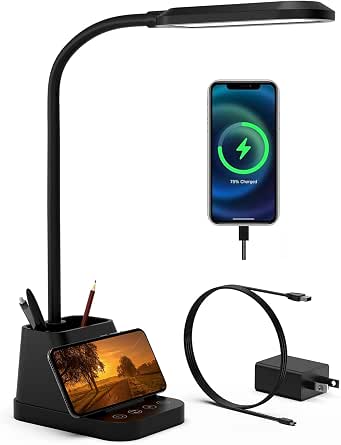 | Best for Flexible Positioning | Light output: 650 lumens | Light source: 60 integrated LEDs | Color temperatures: 3 | VIEW ON AMAZON | See Our Full Breakdown |
| White Crown Dimmable LED Desk Lamp with USB Charging Port | 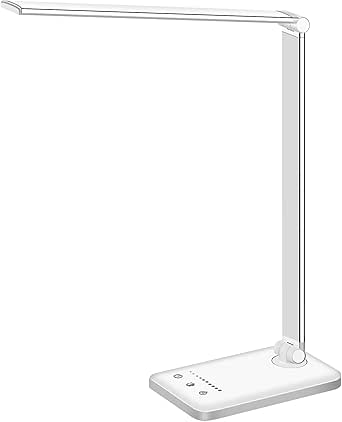 | Best Simple, Low-Power Pick | Light source: 52 LEDs | Lighting modes: 5 | Brightness: 5 levels | VIEW ON AMAZON | See Our Full Breakdown |
| LED Desk Lamp with USB Charging and AC Outlets, 800 Lumens, White |  | Best for Extra Plug-In Devices | Light output: 800 lumens | Power: 10 watts | Color temperature: 2800K–5500K | VIEW ON AMAZON | See Our Full Breakdown |
| 15W Dimmable LED Desk Lamp with USB-A and USB-C Ports | 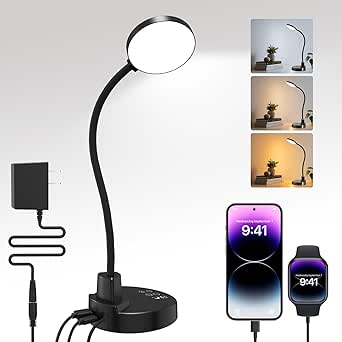 | Best for Timer Flexibility | Power: 15 watts | Light source: 60 LED lamp beads | Color temperatures: 3000K, 4500K, 6000K | VIEW ON AMAZON | See Our Full Breakdown |
| One Beat LED Desk Lamp with Power Strip, 5 ft Extension Cord, 3 Outlets and 4 USB Ports |  | Best for Maximum Desk Connectivity | USB ports: 4 (2 USB-A, 2 USB-C) | AC outlets: 3 | Cord length: 5 ft | VIEW ON AMAZON | See Our Full Breakdown |
| LED Desk Lamp with Power Strip and USB Charging | 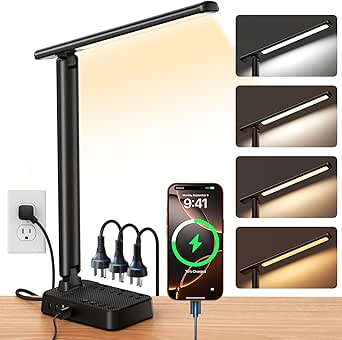 | Best for Fine-Tuned Lighting | Brand: Sompat | Brightness: Stepless, 1%–100% | Color temperature: 2800K–6500K | VIEW ON AMAZON | See Our Full Breakdown |
| JOSTIC LED Desk Lamp with Wireless Charger and USB Port |  | Best for Wireless Charging | Model: EK009A | Wireless charging: 10 W | USB charging: USB port included | VIEW ON AMAZON | See Our Full Breakdown |
| Ambertronix LED Desk Lamp with USB Charging Port |  | Best for Simple, Compact Charging | Model: AT-286 | Brightness levels: 5 | Lighting modes: 3 | VIEW ON AMAZON | See Our Full Breakdown |
| BOHON LED Desk Lamp with USB Charging Port, Dimmable, 3 Color Modes, Black |  | Best for Automatic Light Adjustment | LED count: 56 SMD2835 LEDs | Color temperature: 3000K–5500K | Brightness: Up to 900 lumens | VIEW ON AMAZON | See Our Full Breakdown |
| LED Desk Lamp with USB-A and USB-C Ports, Touch Controls, 5 Color Modes, and Night Light |  | Best for Dual-Port Charging | Power: 8 watts | Color modes: 5 | Brightness levels: 3 | VIEW ON AMAZON | See Our Full Breakdown |
| MONGERY LED Desk Lamp with USB Charging Port and Touch Controls |  | Best for Fine-Tuned Lighting | Brightness: Over 400 lumens | Color temperature: 2700K–6000K | Brightness control: 6 levels with stepless dimming from 10% to 100% | VIEW ON AMAZON | See Our Full Breakdown |
| Shinelife LED Desk Lamp with Touch Controls and USB Charging Port | 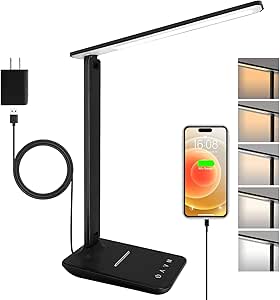 | Best Compact Pick | Brightness: 500 lumens | Brightness levels: 5 | Color temperature: 3000K–6000K | VIEW ON AMAZON | See Our Full Breakdown |
| Sailstar Wireless Charging LED Desk Lamp with USB Port and Pen Holder |  | Best for Multi-Device Desk Charging | Brightness: Up to 800 lumens | Color rendering index: 95 CRI | Power: 8 watts | VIEW ON AMAZON | See Our Full Breakdown |
| led desk lamp with usb charging | Brightness | Power |
|---|---|---|
| COZOO LED Desk Lamp with USB C | 3 levels per color temperature | 10 watts |
| AXX LED Desk Lamp with USB Cha | 5 levels | 10 watts |
| White Crown Dimmable LED Desk | 5 levels | 6 watts |
| LED Desk Lamp with USB Chargin | — | 10 watts |
| 15W Dimmable LED Desk Lamp wit | 5 levels | 15 watts |
| One Beat LED Desk Lamp with Po | — | — |
| LED Desk Lamp with Power Strip | Stepless, 1%–100% | — |
| JOSTIC LED Desk Lamp with Wire | — | — |
| Ambertronix LED Desk Lamp with | — | — |
| BOHON LED Desk Lamp with USB C | Up to 900 lumens | — |
| LED Desk Lamp with USB-A and U | — | 8 watts |
| MONGERY LED Desk Lamp with USB | Over 400 lumens | — |
| Shinelife LED Desk Lamp with T | 500 lumens | — |
| Sailstar Wireless Charging LED | Up to 800 lumens | 8 watts |
More Details on Our Top Picks
COZOO LED Desk Lamp with USB Charging Ports, AC Outlet, and Pen Holder
The COZOO makes the most sense when a desk lamp needs to do more than charge a phone: it adds USB-A, USB-C, an AC outlet, and a pen holder in one tabletop unit. Its 800 lumens match the output of the white lamp with two AC outlets, while the COZOO adds a pen cup and a broader set of explicit light temperatures: 3000K, 4500K, and 6000K. Nine brightness-and-color combinations and a memory function make routine adjustments straightforward, and the folding arm helps direct light across a work area. The tradeoff is that both USB ports are limited to 5V/2.1A, with no QC or PD fast charging. Its integrated LEDs also cannot be replaced, so this is a convenience-focused desk hub rather than a lamp built around long-term component replacement.
Pros:- Combines USB-A, USB-C, an AC outlet, and a pen holder
- 800-lumen output with three color temperatures and three brightness levels
- Foldable arm and rotating head allow flexible light placement
- Touch controls include memory and a 60-minute timer
Cons:- USB ports do not support QC or PD fast charging
- Integrated LED light source is not replaceable
- Plastic base and acrylic shade may not suit buyers seeking a metal build
Best for: Home-office users who want a lamp, two USB charging options, a plug-in outlet, and pen storage together on the desktop.
Not ideal for: People who need fast USB-C charging or want a lamp with a replaceable bulb.
- Light output:800 lumens
- Light source:56 integrated LEDs; not replaceable
- Color temperatures:3000K, 4500K, 6000K
- Brightness:3 levels per color temperature
- Power:10 watts
- Charging:1 USB-A and 1 USB-C, each 5V/2.1A; no QC or PD
- AC outlet:1, rated up to 1250W
- Adjustability:Head rotates up to 340°; arm folds up to 180°
- Controls and extras:Touch controls, memory, 60-minute timer, pen holder
Our verdict“Choose the COZOO if you want charging, an AC outlet, and pen storage built into one adjustable 800-lumen lamp.”
AXX LED Desk Lamp with USB Charging Port, Organizer, and Flexible Gooseneck
The AXX is the most adaptable pick here for readers who frequently change where light falls: its flexible gooseneck can be repositioned without relying on a folding arm and rotating head. It offers 650 lumens, five brightness levels, three color temperatures, and a built-in USB port, alongside pencil and phone holders. Compared with the COZOO, it gives you more brightness steps and a phone stand, but gives up the COZOO’s USB-C port and AC outlet. That makes the AXX better suited to a focused study station than a desk that needs to power several devices. Its 23-inch height offers useful reach, though it takes up more vertical space, and the integrated LEDs are not replaceable. Buyers should also note that the listed USB port is for charging, not a stated fast-charging feature.
Pros:- Flexible gooseneck lets users direct light where a fixed arm may not reach
- Five brightness levels and three color temperatures offer fine adjustment
- Built-in USB port, pencil holder, and phone holder combine desk functions
- 650-lumen output and stated LED lifespan of up to 50,000 hours
Cons:- Only one USB charging port and no AC outlet
- Integrated LEDs cannot be replaced
- About 23 inches tall, which may crowd compact desks
Best for: Students and home workers who want to reposition light often and keep a phone and pencils organized beside the lamp.
Not ideal for: Buyers who need an AC outlet, dual USB ports, or a compact lamp that folds away.
- Light output:650 lumens
- Light source:60 integrated LEDs
- Color temperatures:3
- Brightness:5 levels
- Power:10 watts
- Height:About 23 inches
- Charging:1 USB charging port
- Adjustability and controls:Flexible gooseneck; touch control; timer and memory
- Extras:Pencil holder, phone holder; LED lifespan up to 50,000 hours
Our verdict“Pick the AXX for a tall, repositionable study lamp with a USB port and useful phone-and-pencil storage.”
White Crown Dimmable LED Desk Lamp with USB Charging Port
The White Crown is the straightforward choice for buyers who want adjustable light and a basic USB charging port without adding a desk organizer or AC outlet. Its five lighting modes and five brightness levels offer more lighting steps than the COZOO’s three brightness levels, while its 6-watt draw is lower than the 10-watt COZOO and AXX models. The tradeoff is light output: no lumen figure is provided, so I can’t directly compare its brightness with their 800 and 650 lumens. The USB port is also rated at 5V/1A, below the 5V/2.1A ports on the COZOO, making it a more limited charging option. Touch controls, memory, and 30- or 60-minute shutoff keep operation simple; the aluminum base adds a different material choice from the COZOO’s plastic base.
Pros:- Five lighting modes and five brightness levels
- Touch controls with memory function
- Selectable 30- or 60-minute auto-off timer
- 6-watt power rating and aluminum base
Cons:- USB output is limited to 5V/1A
- No lumen figure is listed, making brightness comparisons difficult
- No battery is included, and the lamp requires corded power
Best for: Readers or students who want a simple touch-controlled lamp with several lighting settings and occasional USB charging.
Not ideal for: People who need higher-output USB charging, a specified high-lumen light, or extra outlets and desk storage.
- Light source:52 LEDs
- Lighting modes:5
- Brightness:5 levels
- Power:6 watts
- USB output:5V/1A
- Controls:Touch controls with memory function
- Timer:30 or 60 minutes
- Base and power:Aluminum base; corded electric, 5 volts
- LED lifespan:Up to 50,000 hours
Our verdict“Choose the White Crown for adjustable lighting and a basic charging port, but skip it if charging speed or measured brightness is a priority.”
LED Desk Lamp with USB Charging and AC Outlets, 800 Lumens, White
For a desk that needs to power more than phones, this white lamp’s two AC outlets are its clearest advantage: they give it one more plug-in connection than the COZOO, while both models provide 800 lumens, USB-A and USB-C charging, and a 60-minute timer. The lamp also lists a CRI above 90, a useful spec for users who want colors to appear more accurately at the desk. Its three brightness levels and three color modes keep adjustments simple, and the foldable arm and rotating head help direct the light. The tradeoff is control over connected power: the USB ports and AC outlets remain powered without a switch. Like the COZOO, it uses 5V/2.1A USB outputs, so neither is the right pick for QC or PD fast charging.
Pros:- 800-lumen output with a listed CRI above 90
- Two AC outlets plus USB-A and USB-C charging ports
- Three brightness levels and three color temperature modes
- Foldable arm and rotating head help aim light across the desk
Cons:- AC outlets and USB ports remain powered without a switch
- USB ports are limited to 5V/2.1A
- Only three brightness levels and three lighting modes
Best for: Home-office users who want a bright desk lamp with two USB ports and two AC outlets for nearby devices.
Not ideal for: Buyers who need a switch to shut off the outlets and USB ports, or who want more than three light settings.
- Light output:800 lumens
- Power:10 watts
- Color temperature:2800K–5500K
- Color rendering:CRI >90
- Light source:56 LEDs
- Lighting controls:3 brightness levels and 3 modes
- Charging:USB-A and USB-C, 5V/2.1A
- AC outlets:2
- Adjustability and timer:Head rotates up to 340° and folds 180°; arm folds 90°; 60-minute timer
Our verdict“Choose this model over the COZOO if a second AC outlet and high color rendering matter more than built-in pen storage.”
15W Dimmable LED Desk Lamp with USB-A and USB-C Ports
This 15-watt lamp suits buyers who want more control over shutoff time and a gooseneck they can aim freely. It offers four timer settings from 30 to 120 minutes, a low-brightness night-light mode, and both USB-A and USB-C output ports. Compared with the AXX, it adds a second USB connection and more timer choices, but the AXX includes a phone holder and pencil storage. Compared with the COZOO, this model lacks an AC outlet and pen holder, but its 360° flexible gooseneck offers a different style of positioning than a folding arm. The USB ports do not support fast charging and cannot power the lamp, which still needs its included AC adapter. Choose it for lighting flexibility, not as a substitute for a desk power strip.
Pros:- Three color temperatures and five brightness levels
- Flexible 360° gooseneck allows broad positioning adjustments
- Four timer settings and a low-brightness night-light mode
- USB-A and USB-C ports can charge devices simultaneously
Cons:- USB ports do not support fast charging
- USB ports cannot power the lamp
- Requires the included AC adapter and has no listed AC outlet
Best for: Desk users who want adjustable gooseneck lighting, two device-charging ports, a night-light mode, and several shutoff intervals.
Not ideal for: People seeking fast charging, an AC outlet, a lower-power lamp, or built-in phone and pen storage.
- Power:15 watts
- Light source:60 LED lamp beads
- Color temperatures:3000K, 4500K, 6000K
- Brightness:5 levels
- USB ports:USB-A and USB-C output; no fast charging and cannot power the lamp
- Timer:30, 60, 90, or 120 minutes
- Adjustability:Flexible 360° gooseneck
- Extra lighting mode:Low-brightness night-light mode
- Power source and base:12-volt corded power; weighted plastic base with non-slip, anti-scratch bottom
Our verdict“Pick this lamp if timer choices and flexible positioning matter more than fast charging, desk storage, or an AC outlet.”
One Beat LED Desk Lamp with Power Strip, 5 ft Extension Cord, 3 Outlets and 4 USB Ports
I’d choose the One Beat when charging and plugging in several devices matters as much as the light. Its cord-mounted strip combines three AC outlets with four USB ports, including USB-C, so a phone, tablet, and desk accessories can share one nearby power source. The lamp still offers four color temperatures and five brightness levels, though it gives less fine control than the Sompat’s stepless dimming. Its foldable arm helps redirect light or clear desk space, but the power strip is the main reason to pick it over the JOSTIC, which adds wireless charging instead. The tradeoffs are a 15 A/1875 W load ceiling and a shell that may become hot during extended use; I’d avoid stacking high-draw equipment on it.
Pros:- Combines three AC outlets with four USB ports, including two USB-C ports.
- Four color temperatures and five brightness levels accommodate different tasks.
- Foldable arm supports flexible positioning and easier storage.
- USB charging remains available whether the lamp is on or off.
Cons:- Connected devices must stay within the 15 A/1875 W maximum load.
- The lamp shell may become hot during extended use.
Best for: Desk users who need to charge several USB devices and plug in multiple low-to-moderate-power accessories from one cord.
Not ideal for: People who want wireless charging, very fine brightness adjustment, or a power strip for multiple high-wattage appliances.
- USB ports:4 (2 USB-A, 2 USB-C)
- AC outlets:3
- Cord length:5 ft
- Brightness levels:5
- Color temperatures:4
- Lamp arm:90° foldable
- Maximum current:15 A
- Voltage:120 V
Our verdict“Pick the One Beat if a built-in power strip with USB-A and USB-C matters more than wireless charging or stepless dimming.”
LED Desk Lamp with Power Strip and USB Charging
The Sompat earns its place for buyers who want unusually precise control alongside desk charging. Its stepless 1%–100% dimming and adjustable 2800K–6500K color range make it easier to move from warm evening light to brighter, cooler task lighting than with the One Beat’s fixed brightness and color steps. Both lamps offer three AC outlets and four USB ports, but Sompat adds a one-hour timer and brightness memory. Its adjustable arm and head help aim light without shifting the base. The limit is its 1200 W/10 A maximum load, lower than the One Beat’s, and it still needs a wall outlet. I’d pick it for lighting flexibility, not for powering demanding equipment.
Pros:- Stepless brightness control runs from 1% to 100%.
- Color temperature adjusts across a wide 2800K–6500K range.
- Three AC outlets and four USB ports support a mix of desk devices.
- Timer and brightness memory add useful everyday controls.
Cons:- Maximum connected load is 1200 W/10 A, below the One Beat’s stated limit.
- Corded design requires a nearby outlet.
Best for: People who work at a desk through changing tasks or times of day and want both detailed light adjustment and several charging connections.
Not ideal for: Users who need a power strip for higher-wattage devices or a lamp that works without access to a wall outlet.
- Brand:Sompat
- Brightness:Stepless, 1%–100%
- Color temperature:2800K–6500K
- Power outlets:3 AC outlets
- USB ports:4 (2 USB-C, 2 USB-A)
- Maximum load:1200 W/10 A
- Timer:1 hour
- Cord length:5 ft
- Adjustments:90° arm; 180° light head
Our verdict“Choose the Sompat over the One Beat if precise dimming and color adjustment matter more than a higher stated power limit.”
JOSTIC LED Desk Lamp with Wireless Charger and USB Port
The JOSTIC is the clearest choice here for someone who wants to set a compatible phone on the base instead of connecting another cable. Its 10 W wireless charger sits alongside a USB port, while five lighting modes and ten brightness levels provide more combinations than the Ambertronix’s three modes and five levels. A 225° flexible arm and adjustable base axis make it adaptable to different desk setups, and the 30- or 60-minute timer suits a lamp used near bedtime. Unlike the One Beat and Sompat, it has no AC outlets, so it won’t replace a desk power strip. Wireless charging also depends on device compatibility, and its corded power requirement limits where it can go.
Pros:- 10 W wireless charging reduces the need for a separate phone cable.
- A USB port provides an additional wired charging option.
- Five modes and ten brightness levels offer varied lighting choices.
- Flexible arm, adjustable base axis, and sleep timer support adaptable use.
Cons:- Does not include AC outlets like the One Beat and Sompat.
- Wireless charging requires a compatible device.
- Needs corded power and is not waterproof.
Best for: People with a wireless-charging-compatible phone who want a compact lamp with both wireless and wired USB charging.
Not ideal for: Buyers who need AC outlets, want to charge several devices at once, or need a cordless lamp.
- Model:EK009A
- Wireless charging:10 W
- USB charging:USB port included
- Lighting modes:5
- Brightness levels:10
- Timer:30 or 60 minutes
- Adjustability:225° flexible arm; 160° base axis
- Wattage:8 W
Our verdict“Choose the JOSTIC if wireless phone charging is your priority and you can do without built-in AC outlets.”
Ambertronix LED Desk Lamp with USB Charging Port
Ambertronix keeps the setup straightforward: a foldable lamp, touch controls, and a USB charging port for a phone. Its five brightness levels and three lighting modes cover basic adjustments without the broader range of the Sompat or the wireless charging found on the JOSTIC. The 30- or 60-minute auto-off timer is useful for a desk that doubles as a bedside workspace, while its 350 g weight and foldable form suit users who may need to put the lamp away. The main catch is practical: the power adapter is not included, so buyers need a compatible 5 V, 1–2 A source. USB charging is wired only, and there are no AC outlets or wireless pad.
Pros:- Foldable, lightweight design is easy to store or move.
- Five brightness levels and three lighting modes cover everyday adjustments.
- USB port can charge a phone while the lamp is set up.
- 30- or 60-minute auto-off timer supports bedtime use.
Cons:- Power adapter is not included.
- Charging is wired, with no wireless pad or AC outlets.
- Offers fewer lighting options than the Sompat or JOSTIC.
Best for: Students or occasional desk users who want a lightweight, foldable lamp with basic lighting controls and wired phone charging.
Not ideal for: Buyers who expect an included adapter, wireless charging, multiple device ports, or adjustable color temperature.
- Model:AT-286
- Brightness levels:5
- Lighting modes:3
- USB charging:USB port included
- Timer:30 or 60 minutes
- Recommended power source:5 V, 1–2 A
- Weight:350 g
- Dimensions:4.6 × 7.3 × 15.5 in (D × W × H)
Our verdict“Pick Ambertronix for a lightweight, basic USB-charging lamp only if you already have a suitable power adapter.”
BOHON LED Desk Lamp with USB Charging Port, Dimmable, 3 Color Modes, Black
BOHON stands out for people who want a simple USB-charging lamp that can respond to changing room light. Its automatic ambient-light dimming adjusts brightness, while a rotary control and three color modes give more direct input than the Ambertronix’s preset levels. The USB port works with the lamp on or off, a handy detail for charging without keeping the light running. At up to 900 lumens, it also offers a stated output figure absent from several other picks here. Compared with the JOSTIC, though, BOHON has no wireless charging or timer; compared with the One Beat, it adds no AC outlets. Its flexible neck helps with aiming, but the corded, non-water-resistant build is for indoor desk use.
Pros:- Automatic ambient-light dimming can adapt brightness to the room.
- USB charging works whether the lamp is on or off.
- Rotary brightness control and three color modes offer direct adjustments.
- Flexible neck and anti-slip base support stable positioning.
Cons:- No wireless charging or timer, unlike the JOSTIC.
- Has no AC outlets for plugging in desk equipment.
- Corded and not water resistant.
Best for: Home-office users who want a flexible-neck lamp with automatic brightness adjustment and a USB port that remains usable when the light is off.
Not ideal for: People seeking wireless charging, a sleep timer, AC outlets, or a lamp for damp areas.
- LED count:56 SMD2835 LEDs
- Color temperature:3000K–5500K
- Brightness:Up to 900 lumens
- Wattage:10 W
- Color modes:3
- Dimming:Rotary control and automatic ambient-light dimming
- USB charging:Usable when lamp is on or off
- Included adapter:5 V, 2 A
Our verdict“Choose BOHON if automatic dimming and an always-available USB port matter more than wireless charging or extra outlets.”
LED Desk Lamp with USB-A and USB-C Ports, Touch Controls, 5 Color Modes, and Night Light
I’d choose this lamp when charging flexibility matters as much as desk lighting. Its USB-A and USB-C ports let you connect devices with either plug type, a useful advantage over the Shinelife, whose single USB port is rated at 5V/1A. Five color modes and three brightness levels cover basic shifts from focused work to softer evening light, while the separate night light adds a low-glare option. The foldable arm also makes it easier to redirect or store than a fixed lamp. The tradeoff is less granular brightness control than the MONGERY’s stepless dimming, and the charging specifications do not promise fast charging. It needs a wall outlet, so it won’t suit a cordless setup.
Pros:- USB-A and USB-C ports support two common cable types
- Five color modes and three brightness levels offer straightforward lighting adjustments
- Foldable arm helps direct light or reduce desk clutter
- Separate soft night light can provide low-level illumination
Cons:- Three brightness levels offer less control than the MONGERY’s stepless dimming
- Requires corded power and is not waterproof
- USB charging performance is not specified beyond the port rating
Best for: Desk users who need both USB-A and USB-C charging options and want an adjustable lamp with a separate low-light setting.
Not ideal for: Buyers who want fine-grained dimming, cordless operation, or clearly specified fast charging.
- Power:8 watts
- Color modes:5
- Brightness levels:3
- USB ports:USB-A and USB-C, 5V/2.1A
- Controls:Touch
- Lighting feature:Soft night light
- Dimensions:14.92 × 4.45 × 1.85 inches
- Weight:1.4 pounds
Our verdict“Pick this lamp if dual USB-A and USB-C ports matter more to you than stepless dimming or clearly stated charging speed.”
MONGERY LED Desk Lamp with USB Charging Port and Touch Controls
The MONGERY is the lighting-control pick in this group, pairing six color temperatures with six brightness levels and stepless dimming from 10% to 100%. That range makes it easier to set a precise level for reading, screen work, or a shared room than the three-step controls on the dual-port lamp. It also claims over 400 lumens of flicker-free output and adds a one-hour auto-off timer, which can suit a focused study routine. Its foldable aluminum construction and weighted base add practical desk stability. The compromise is the charging information: the 5W USB port is listed without device compatibility or performance detail. Compared with the Sailstar, it lacks wireless charging and a pen holder, but its lighting adjustments are more extensive.
Pros:- Six color temperatures span 2700K to 6000K
- Stepless dimming provides finer adjustment than fixed brightness steps
- Over 400 lumens of flicker-free light is suited to desk tasks
- Foldable aluminum design includes a weighted base and one-hour auto-off timer
Cons:- The USB port is rated at 5W, with device compatibility and charging performance unspecified
- No warranty duration is provided in the product details
- Does not offer the Sailstar’s wireless charging or built-in pen holder
Best for: Readers and students who want broad color-temperature choices, precise dimming, and a timer for focused desk sessions.
Not ideal for: Buyers who need USB-A and USB-C ports, wireless charging, or detailed confirmation of the lamp’s USB charging compatibility.
- Brightness:Over 400 lumens
- Color temperature:2700K–6000K
- Brightness control:6 levels with stepless dimming from 10% to 100%
- USB port:5W
- Wattage:24 watts
- Controls:Touch
- Timer:1-hour auto-off
- Materials:Aluminum base and shade; plastic
Our verdict“Choose the MONGERY if precise, flexible lighting matters more than extra charging formats or desk-organizing features.”
Shinelife LED Desk Lamp with Touch Controls and USB Charging Port
At 0.99 pounds, the Shinelife is the lightest, simplest choice here for a small desk or a lamp that may need to move between workspaces. Its rotating head and foldable base make directing light less restrictive than with a basic fixed design, and its 500 lumens give a defined brightness figure for reading or study. Five brightness levels and five color temperatures offer useful adjustment without the more elaborate controls of the MONGERY. The cost of its compact approach is charging capacity: the 5V/1A USB port is modest, and it has no USB-C port or wireless charging like the Sailstar. A two-year warranty is a useful point of reassurance, but corded power still limits placement.
Pros:- Lightweight design is easy to reposition between workspaces
- 500-lumen output and five brightness levels support varied desk tasks
- Rotating head and foldable base allow flexible positioning
- Includes a two-year warranty
Cons:- USB output is limited to 5V/1A
- Only one USB charging port, unlike the dual-port B08923SXXP
- Requires corded power
Best for: Students or remote workers with limited desk space who want a lightweight, adjustable lamp and occasional USB charging.
Not ideal for: People who charge power-hungry devices at their desk or want USB-C, wireless charging, or a higher-output charging port.
- Brightness:500 lumens
- Brightness levels:5
- Color temperature:3000K–6000K
- USB port:5V/1A
- Lamp head rotation:180°
- Base fold angle:90°
- Weight:0.99 pounds
- Warranty:2 years
Our verdict“Choose the Shinelife for a compact, movable desk lamp, but look elsewhere if charging speed or multiple device ports are priorities.”
Sailstar Wireless Charging LED Desk Lamp with USB Port and Pen Holder
The Sailstar suits a desk where charging and organization need to share the same footprint. It combines a 10W wireless charging pad with a separate 5W USB port, so compatible phones can charge without a cable while another device uses USB. Its flexible arm and pen holder make it more of a compact workstation hub than the Shinelife, which focuses on lightweight portability. Lighting is also a strength on paper: output reaches 800 lumens, the listed color rendering index is 95 CRI, and dimming plus three color modes cover everyday tasks. The tradeoff is compatibility and power: wireless charging requires a supported device and the included adapter, while USB output is limited to 5W. Its plastic construction may also feel less substantial than the MONGERY’s aluminum build.
Pros:- Combines 10W wireless charging with a separate 5W USB port
- Up to 800 lumens and 95 CRI support bright, color-conscious desk work
- 360° flexible arm helps direct light where needed
- Pen holder and memory function add practical desk convenience
Cons:- Wireless charging requires a compatible device and the included 5V/3A adapter
- USB output is limited to 5W
- Plastic and ABS construction may feel less substantial than the MONGERY’s aluminum design
Best for: People with a compatible wireless-charging phone who want to charge two devices and keep pens close at hand.
Not ideal for: Buyers without a compatible wireless-charging device, or anyone seeking a higher-output wired USB port or a metal-bodied lamp.
- Brightness:Up to 800 lumens
- Color rendering index:95 CRI
- Power:8 watts
- Lighting:3 color modes with dimming
- Wireless charging:10W
- USB charging:5V/1A, up to 5W
- Arm:360° flexible
- Features:Memory function and pen holder
Our verdict“Pick the Sailstar if you have a compatible wireless-charging device and want lighting, charging, and pen storage in one desk fixture.”
How We Picked
I ranked these lamps by how well they serve the specific combined job of lighting a desk and charging devices. I weighed the stated charging setup—USB-A, USB-C, wireless charging, and AC outlets—alongside light controls such as dimming and color modes, flexibility, organizer features, and how much desk space the design may occupy. I also looked at whether a lamp’s extra functions solve a distinct problem or add complexity without a clear benefit.
The order favors useful balance over the biggest feature count: COZOO ranks first for combining lighting, USB charging, an AC outlet, and storage, while One Beat ranks higher for buyers who need a multi-device power hub. More specialized choices, including wireless-charging lamps and compact touch-control models, rank below the broad-utility picks because their appeal depends on a narrower need. Product details here are based on the listed features; where charging speed, brightness controls, or compatibility are not specified, I avoid treating them as confirmed advantages.
Factors to Consider When Choosing Led Desk Lamp With Usb Charging
Before choosing a lamp, decide what job the charging feature needs to do. A built-in USB port may be enough for occasional phone charging, but a crowded desk with several powered devices can call for AC outlets or a separate power strip. These factors help distinguish useful convenience from features that may not fit your setup.
Match the charging ports to your devices
Start by listing what you expect to charge at the desk, then match the ports to those devices. USB-A remains useful for many accessories, while USB-C can reduce the need for an adapter when your phone or other device uses that connector. A lamp listing a USB port does not by itself tell you its charging speed, so check the manufacturer’s specifications if fast charging matters. Avoid choosing by port count alone: several ports are less useful if they cannot serve your devices or if their output is limited. For a mix of older and newer gear, a model with both USB-A and USB-C offers more flexibility than one with an unspecified USB port.
Decide whether you need outlets or just USB charging
USB ports suit phones and small electronics, but they do not replace AC outlets for a monitor, laptop adapter, or other plug-in equipment. Lamps with built-in outlets or power-strip layouts can reduce the need to reach a wall socket, though they also introduce extra cables and occupy more desk or floor space. A multi-outlet model makes the most sense when your current setup genuinely lacks accessible plugs. If you only charge a phone, a simpler USB lamp may keep the workspace tidier. Check the product’s electrical specifications and the placement of its outlets before using it as a substitute for a dedicated power strip.
Choose lighting controls for your actual work
Dimming can help when the same desk is used for detailed tasks and relaxed evening reading, while multiple color modes let you change the light’s character. More settings are not automatically better: touch controls may be convenient, but they can be less direct than a clearly marked physical switch for some users. Look for the brightness range and color temperature details rather than relying on a mode count alone. If you work with printed materials or detailed craft tasks, prioritize usable light adjustment over extra charging features. For occasional desk use, a straightforward lamp may be easier to operate and take up less room.
Check reach, placement, and desk footprint
A lamp that cannot position its light where you need it can create glare or leave parts of the work area dim. Flexible goosenecks and adjustable arms help tailor the beam, while a larger base or built-in organizer can claim space that a compact lamp would leave open. Measure the available surface and note where your monitor, notebook, and charging cable sit before choosing. Also think about whether the USB port is reachable when the lamp is in its working position. A power hub may be useful on a broad desk, but a small study surface often benefits more from a compact footprint.
Treat wireless charging as a compatibility feature
Wireless charging can reduce cable clutter, but it only helps if your phone supports the relevant charging standard and sits correctly on the charging area. Cases, camera bumps, and the phone’s position can affect alignment, so check the lamp’s instructions and your device’s compatibility before relying on it. Wireless charging may also occupy a convenient part of the lamp base, limiting its use for storage or writing materials. A wired USB connection is often easier to position while using a phone. Choose wireless charging for convenience, not on the assumption that it will replace every charging cable.
Pay for features you will use, not a longer spec list
Extra outlets, organizers, wireless pads, and multiple lighting modes each add a different kind of convenience, but each can also make a lamp larger or more involved to set up. Decide which problem you are solving first: limited outlets, a messy desk, changing light needs, or cable clutter. Then compare models that address that priority instead of treating every added feature as an upgrade. A simpler lamp may be the better fit if you already have a charging hub nearby. When choosing a more feature-rich option, confirm its dimensions, power requirements, and the details of the functions you plan to use.
Frequently Asked Questions
Is a lamp with USB-A and USB-C a better choice than one with more USB ports?
It depends on the devices you charge. A mix of USB-A and USB-C can be more useful than several ports of one type if your desk has both older accessories and newer phones or tablets. The number and type of ports do not confirm charging speed, so check the listed output if that affects your choice. The 15W dimmable lamp and the touch-control model with five color modes specify both USB types, while several other listings do not specify USB-C. Choose the port mix that matches your devices rather than the largest count.
Should I choose a lamp with AC outlets or buy a separate power strip?
A lamp with AC outlets can make sense when you want power within easy reach and the number of plugs you need is modest. A dedicated power strip may suit a setup with several larger devices or when you need to position outlets away from the lamp. Multi-outlet lamps such as One Beat add substantial connectivity, but their cords and hub-style layout can take up more space. Check the device’s electrical ratings and instructions before connecting higher-demand equipment. If the lamp will be difficult to position near your devices, a separate strip may offer more placement freedom.
Can I use wireless charging on the JOSTIC or Sailstar with any phone?
No; your phone must support wireless charging, and it needs to sit in the right position on the lamp’s charging area. Check your phone’s specifications and the lamp’s compatibility details before relying on this feature. A bulky case or uneven placement can interfere, depending on the phone and charger design. Both JOSTIC and Sailstar include wireless charging in their listed features, but the listings do not establish compatibility with every device. Keep a wired charging option available if you need dependable charging while using your phone.
Which type of lamp is a better fit for a small desk?
For a small surface, prioritize the lamp’s base size, arm reach, and where its charging ports sit rather than choosing by feature count. A power-strip-style lamp may be convenient but can occupy more space and add cables. Organizer features such as a pen holder are useful only if they replace storage you already need. Flexible designs can help direct light without moving the base, though the listed product details do not give dimensions for every model. Measure the space beside your monitor and keep room for notebooks and charging cables before deciding.
Does having more dimming or color modes mean a lamp will light my desk better?
Not necessarily. More modes give you additional ways to adjust the light, but they do not confirm brightness, beam coverage, or how evenly the light reaches your work surface. Check the lamp’s brightness and color temperature specifications if those details matter for reading or detailed work. A simpler dimmable lamp may be easier to operate than a model with many settings, especially if you only use one lighting level. Match the controls to your routine and look for a clear description of the lamp’s actual light output.
Conclusion
For a single lamp that combines useful desk features, I recommend the COZOO as the best overall, thanks to its USB ports, AC outlet, and pen holder. The One Beat is my best pick for charging capacity if you need several outlets and USB ports in one hub, while the 15W dimmable USB-A/USB-C lamp is a strong fit for buyers who want a more direct mix of current and older charging connectors. For wireless charging, compare the JOSTIC and Sailstar against your phone’s compatibility and your available desk space. Beginners who want familiar lighting controls and a straightforward setup should favor a simpler dimmable or touch-control model, such as the White Crown or MONGERY, after checking the exact control and brightness specifications. My best value recommendation is the AXX for buyers who prioritize a flexible gooseneck and organizer, while shoppers who need a compact or specific-purpose setup should choose based on footprint and charging type rather than feature count alone.