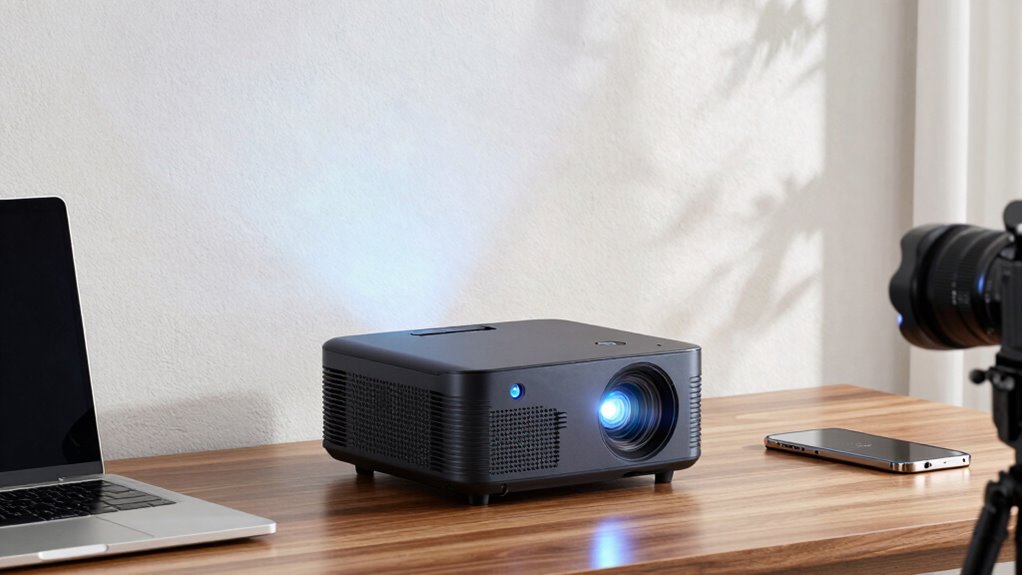

A portable 1080p projector for presentations needs to do more than display a sharp image: quick setup, readable text, reliable connections, and manageable size matter just as much. My best overall pick is the White Smart Mini Projector with WiFi and Bluetooth, which pairs native 1080p resolution with autofocus and a 360° stand for flexible placement. The Kodak Ultra Mini stands out for compact, rechargeable use, while the FUDONI Portable Projector offers native 1080p and several connection options. The main tradeoffs are brightness and portability, along with whether convenience features can replace a direct laptop connection. Read on for the full comparison and advice on matching a projector to your presentation setup.

Get furniture and decor delivered free with Prime
- Fast, free delivery on millions of items
- Prime Video, Amazon Music and more included
- Member-only deals all year
Complete the kit


Key Takeaways
- Native 1080p is a better presentation baseline than 4K support alone: several listings distinguish between native resolution and supported input, so check what the projector actually displays.
- Fast setup features separate several of the most presentation-friendly options: autofocus, auto keystone, and adjustable stands can reduce setup fuss, but they do not replace careful alignment.
- The Kodak Ultra Mini is the clearest portability-first choice: its rechargeable design and compact format suit mobile use, while the small form factor may require compromises in image scale and room flexibility.
- Connectivity is not the same as presentation readiness: WiFi and Bluetooth broaden device options, but a direct HDMI connection can be more dependable for live slides.
- Brightness claims need context: large-screen and outdoor language appears across this lineup, but screen size alone does not show whether small text will remain readable in a lit meeting room.


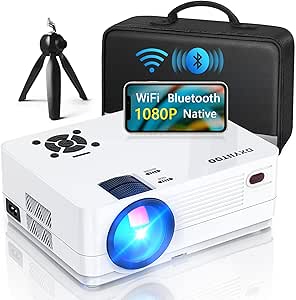


| portable projector for presentations 1080p | Connectivity | Native resolution | Weight | Throw distance |
|---|---|---|---|---|
| White Smart Mini Projector wit | Wi-Fi 6, Bluetooth 5.2, HDMI, USB, 3.5 mm jack | 1920 × 1080 | 1.89 lb | — |
| Electric Focus Mini Projector | Wi-Fi, Bluetooth, HDMI, USB | 1920 × 1080 | — | 3.3–9.8 ft |
| TMY Native 1080P Mini Portable | HDMI, USB, Bluetooth, 3.5 mm jack | 1280 × 720 | — | — |
| AuKing 2024 Upgraded Mini Proj | HDMI, USB, VGA | 1920 × 1080 | Not specified | 3.5–16.9 ft |
| Mini Projector | HDMI, USB, AV, 3.5 mm jack | 1920 × 1080 | 1.1 lb | — |
| Mini Projector with WiFi and B | 3.5 mm jack, Bluetooth, HDMI, USB, Wi-Fi | 1920 × 1080 | 880 g | 1–5 m |
| Native 1080P Projector with Wi | HDMI, USB, VGA, AV, 3.5 mm audio | 1920 × 1080 | — | 0.95–5.5 m |
| Mini Projector with WiFi and B | HDMI, USB, Wi-Fi, Bluetooth | 1280 × 720 | 0.77 lb | — |
| iTJQ Mini Projector 1080P Smar | Wi-Fi 6, Bluetooth 5.4, HDMI, USB-C, USB, 3.5 mm jack | — | 0.9 kg | — |
| Mini Projector 4K Support | HDMI, USB | 1280 × 720 | — | 1–5 m |
| Mini Video Projector with WiFi | Wi-Fi, Bluetooth, HDMI, USB | 1920 x 1080 | Listed as lightweight | 1–3 meters |
| HAPPRUN Native 1080P Bluetooth | Bluetooth, HDMI, USB, 3.5 mm jack, IR | 1920 x 1080 | — | 1.2–7 meters |
| Mini Projector | Wi-Fi 6, Bluetooth, HDMI, USB | 1280 x 720 | — | 0.5–3 meters |
| Kodak Ultra Mini Portable Proj | HDMI, USB, MicroSD, 3.5 mm jack | 640 x 360 | 6.35 ounces | — |
| FUDONI Portable Projector with | Wi-Fi, Bluetooth 5.3, HDMI, USB, VGA, AV | 1920 x 1080 | 2.9 pounds | 3.6–29.6 feet |
More Details on Our Top Picks
White Smart Mini Projector with WiFi and Bluetooth, 4K Support, Native 1080P, Portable Outdoor Projector with Auto Focus and 360° Stand
For presentation use, I’d favor this XuanPad when setup speed and positioning flexibility matter more than a documented brightness figure. Its native 1080p resolution gives text and charts a clearer basis than a model that only accepts a 1080p signal, while autofocus and 6D keystone correction can reduce manual adjustment when a meeting room has limited placement options. The 360° stand also makes aiming easier in temporary spaces. Compared with the Electric Focus Mini Projector, this one adds built-in apps and a stated weight of 1.89 pounds, but its brightness is not specified, so I can’t confidently rank it for rooms with daylight. The lack of a stated battery life also means portability does not equal cordless presenting; plan on access to power.
Pros:- Native 1920 × 1080 resolution supports legible slides and fine text.
- Autofocus, 6D keystone correction, and a rotatable stand simplify placement.
- At 1.89 pounds, it is easier to carry between rooms than a full-size projector.
- Wi-Fi 6, Bluetooth 5.2, HDMI, and USB provide several connection paths.
Cons:- No brightness figure is provided, making performance in ambient light hard to judge.
- Battery life is unspecified, so mobile use may still depend on an outlet.
- The 40- to 200-inch image range does not guarantee usable clarity at the largest size.
Best for: Presenters who move between small, dim meeting rooms and want automatic image adjustment, native 1080p, and a lightweight unit.
Not ideal for: People presenting in bright rooms or away from outlets, since brightness and battery life are not specified.
- Native resolution:1920 × 1080
- Maximum supported resolution:3840 × 2160
- Weight:1.89 lb
- Connectivity:Wi-Fi 6, Bluetooth 5.2, HDMI, USB, 3.5 mm jack
- Projection size:40–200 inches
- Image adjustment:Autofocus, 6D keystone correction, zoom
- Stand:360° rotatable
- Built-in apps:YouTube, Prime Video, Netflix
Our verdict“Choose the XuanPad for portable, quick setup in dim spaces, but pick a model with a stated brightness rating for daylight presentations.”
Electric Focus Mini Projector with 5G WiFi and Bluetooth, Support FHD 1080P, Portable Movie Projector with Auto Keystone, Compatible with iOS/Android/TV Stick/HDMI/PS5
I’d put the Electric Focus Mini Projector near the front of the shortlist for laptop-led presentations because it pairs native 1080p with remote-controlled electric focus and a listed 12,000-lumen brightness figure. That combination points to a more presentation-oriented setup than the TMY projector, whose supplied screen is convenient but whose listed native resolution is only 1280 × 720. The Electric Focus model also offers HDMI and USB, useful when a reliable cable connection matters more than wireless mirroring. Its tradeoff is that the brightness claim lacks a stated measurement standard, so I would not treat it as proof of strong daylight performance. Streaming is another limitation: HDCP restrictions can block popular services, and the product data does not provide its weight. I’d plan to use a laptop or presentation source rather than depend on built-in streaming.
Pros:- Native 1920 × 1080 resolution is suited to detailed slides and text.
- Electric focus can sharpen the image without reaching the projector.
- HDMI and USB support straightforward connections to laptops and other sources.
- Auto keystone can help when the projector cannot sit directly in front of the screen.
Cons:- HDCP restrictions can prevent direct playback from several streaming services.
- Weight is not listed, which makes it difficult to assess for frequent travel.
- The brightness figure is provided without a measurement standard, limiting comparison.
Best for: Presenters who bring a laptop or HDMI source and want remote electric focus plus a stated brightness specification.
Not ideal for: People who need a verified lightweight carry, direct access to streaming services, or dependable projection in bright rooms.
- Native resolution:1920 × 1080
- Display type:LCD
- Brightness:12,000 lm (as listed)
- Contrast ratio:15,000:1
- Maximum image size:180 inches
- Throw distance:3.3–9.8 ft
- Connectivity:Wi-Fi, Bluetooth, HDMI, USB
- Focus and correction:Electric focus, auto keystone
Our verdict“Choose this model for laptop-based presentations where electric focus and direct connections matter more than streaming or verified room-light performance.”
TMY Native 1080P Mini Portable Projector with 80-Inch Screen and Bluetooth
The TMY’s clearest advantage is what comes in the box: an 80-inch foldable screen gives a first-time presenter a ready display surface without needing to source one separately. That makes it more self-contained than the VISSPL projector, which includes a tripod but no screen. There is an important resolution caveat, though: the supplied data lists 1280 × 720 native resolution and a maximum display resolution of 1920 × 1080. For slide decks with small labels or dense spreadsheets, I’d prefer the XuanPad’s clearly stated native 1080p panel. The TMY still makes sense for simple, larger visuals in a controlled, dim space, especially when the included screen removes setup guesswork. Phone connections may require adapters, and Bluetooth is for audio rather than wireless image sharing.
Pros:- Includes an 80-inch foldable screen for a ready-to-use projection surface.
- HDMI, USB, Bluetooth, and a 3.5 mm jack offer varied connection options.
- Portable form factor suits occasional use in different locations.
- Specified projection distance of 1.5–6 m helps with basic room planning.
Cons:- Listed native resolution is 1280 × 720, below the XuanPad’s native 1080p.
- Phone connections may require adapters that are not included.
- HDCP restrictions can interfere with mirroring from some streaming apps.
Best for: First-time presenters who need a portable screen included and will show simple slides or larger visuals in a dim room.
Not ideal for: Presenters who need native 1080p detail for dense text, or who expect phone mirroring to work without adapters.
- Native resolution:1280 × 720
- Maximum display resolution:1920 × 1080
- Included screen:80-inch foldable screen
- Projection distance:1.5–6 m
- Contrast ratio:10,000:1
- Lamp life:10,000 hours
- Connectivity:HDMI, USB, Bluetooth, 3.5 mm jack
- Aspect ratio:16:9
Our verdict“Pick the TMY when an included screen and simple setup matter more than native 1080p sharpness.”
AuKing 2024 Upgraded Mini Projector, Full HD 1080P Home Theater Video Projector
Among these five, the AuKing is the better fit when a presentation setup can stay in one room and a large image matters more than easy carrying. Its listed 1920 × 1080 native resolution, 200-inch maximum image size, and throw range reaching 16.9 feet give it more room to fill a distant wall than the VISSPL, which tops out at 160 inches. But the AuKing’s own product information says it is not recommended for PPT or business presentations, a direct warning that weighs heavily for this roundup. I’d treat it as a home-entertainment projector that can handle occasional simple slides, not as a dependable meeting-room tool. Its brightness is listed as 9500 lumens without a measurement standard, and ambient light can reduce image visibility. Weight is also missing, so portability is hard to judge against the XuanPad.
Pros:- Listed native resolution of 1920 × 1080 supports Full HD sources.
- Maximum image size of 200 inches exceeds the VISSPL’s listed 160-inch limit.
- HDMI, USB, and VGA accommodate a range of older and newer source devices.
- Listed 55,000-hour light-source life may suit regular home use.
Cons:- Product information specifically says it is not recommended for PPT or business presentations.
- Ambient light can affect visibility, limiting use in typical bright meeting rooms.
- Weight is not specified, making travel suitability difficult to assess.
Best for: Buyers who want a mostly stationary projector for dim-room entertainment and occasional, uncomplicated presentations.
Not ideal for: Frequent business presenters who need clear slides in ambient light, predictable portability, or a product positioned for PPT use.
- Native resolution:1920 × 1080
- Maximum image size:200 inches
- Brightness:9,500 lm (as listed)
- Contrast ratio:10,000:1
- Throw distance:3.5–16.9 ft
- Light-source life:55,000 hours
- Connectivity:HDMI, USB, VGA
- Weight:Not specified
Our verdict“Choose the AuKing for a mostly fixed, dim-room setup with occasional simple slides, not for routine business presenting.”
Mini Projector, VISSPL Full HD 1080P Portable Outdoor Projector with Tripod
At 1.1 pounds, the VISSPL is the easiest pick here to slip into a work bag, and its included tripod makes quick placement less dependent on finding a level table. It is listed as native 1920 × 1080, a stronger resolution match for slide text than the TMY’s listed 1280 × 720 native panel. The tradeoff is that the available data offers no brightness rating, while the Electric Focus Mini Projector at least provides a stated figure and remote electric focus. That makes the VISSPL easier to justify for short sessions in a darkened room than for a bright conference space. Its HDMI, USB, AV, and 3.5 mm connections keep wired sources practical, but HDCP restrictions can block direct streaming, and the maximum image size is 160 inches.
Pros:- At 1.1 pounds, it is the lightest option in this group with a listed weight.
- Listed native 1920 × 1080 resolution is suited to presentation text and graphics.
- Included tripod helps with quick placement away from a flat tabletop.
- HDMI, USB, AV, and 3.5 mm jack support several wired source and audio options.
Cons:- No brightness rating is provided, so suitability for lit rooms is uncertain.
- HDCP restrictions prevent direct playback from some major streaming services.
- Maximum image size is 160 inches, smaller than the AuKing’s listed 200-inch maximum.
Best for: Traveling presenters who prioritize low carry weight, a supplied tripod, and wired connections for small, dim presentation spaces.
Not ideal for: People presenting in bright rooms, needing wireless presentation features, or relying on direct access to streaming services.
- Native resolution:1920 × 1080
- Display type:LED
- Weight:1.1 lb
- Dimensions:6.1 × 5.08 × 2.4 in
- Image size:35–160 inches
- Light-source life:55,000 hours
- Connectivity:HDMI, USB, AV, 3.5 mm jack
- Included accessory:Mini tripod
Our verdict“Choose the VISSPL when minimizing carry weight and setting up quickly matter more than brightness data or a large image.”
Mini Projector with WiFi and Bluetooth, 4K Support, Native 1080P, Auto Focus, Portable Outdoor Home Theater
Native 1080p resolution, autofocus, and digital keystone correction make this a practical choice when presentations need to be set up quickly in changing rooms. Its 880 g weight and rotatable stand also make it easier to carry and aim than the larger 300-inch model from Product 7. For slides, the key advantage is convenience rather than a clearly established brightness lead: the listing gives conflicting brightness figures, so I would not choose it for a sunlit room. Wi-Fi 6, HDMI, USB, and Bluetooth provide flexible connections, though wireless presentation reliability still depends on the source device and network. Compared with the wired-only Product 10, this model offers more connection choices, but its listed maximum image size is smaller and brightness claims are inconsistent.
Pros:- Native 1920 × 1080 resolution suits detailed slides and text.
- Autofocus and digital keystone correction can shorten setup.
- Lightweight 880 g build with a rotatable stand.
- HDMI, USB, Wi-Fi, Bluetooth, and a 3.5 mm jack offer varied connections.
Cons:- Conflicting brightness claims make room suitability hard to judge.
- Maximum listed image size is 120 inches, smaller than Product 7’s stated 300 inches.
- Wireless streaming and presentation functions may depend on compatible devices.
Best for: Presenters who carry a lightweight projector between small meeting rooms and value autofocus and flexible wireless connections.
Not ideal for: People presenting in bright rooms or needing a confidently specified brightness level; the listing gives inconsistent lumen figures.
- Native resolution:1920 × 1080
- Listed brightness:1500 lm; description also claims 3000 ANSI lumens
- Maximum image size:120 inches
- Throw distance:1–5 m
- Weight:880 g
- Connectivity:3.5 mm jack, Bluetooth, HDMI, USB, Wi-Fi
- Focus and alignment:Autofocus and digital keystone correction
- Mounting options:Tabletop, ceiling, tripod, floor
Our verdict“Choose this for portable, fast setup in dim or controlled rooms, but look elsewhere if verified brightness is your priority.”
Native 1080P Projector with WiFi 6 and Bluetooth, Full HD Video Projector for Outdoor Movies, 300″ Display, 4K Compatible
Native 1080p and a stated maximum image size of 300 inches give this projector the biggest-screen role in this group, which can help when slides must reach a large audience. Its HDMI, USB, VGA, and AV inputs also make it more accommodating for older presentation equipment than the compact Product 8, which lists HDMI and USB only. The tradeoff is portability: the product information describes it as heavy without giving a weight, so it may be less convenient to carry and place than the 0.77 lb Product 8. The listed 20,000-lumen brightness should be treated cautiously because the same description says the image works best in a dark environment. For readable slides, plan on controlled lighting and a sturdy surface rather than relying on headline brightness alone.
Pros:- Native 1920 × 1080 resolution for Full HD slide detail.
- Maximum stated image size of 300 inches suits large spaces.
- HDMI, USB, VGA, and AV support a broad range of source devices.
- Listed lamp life is 100,000 hours.
Cons:- Described as heavy, which can make transport and placement less convenient.
- The listing says optimal picture quality requires a dark environment.
- The stated 20,000-lumen brightness is not enough on its own to establish performance in bright rooms.
Best for: Presenters addressing large groups who need a very large image and may connect laptops or older equipment through VGA.
Not ideal for: Frequent travelers and people presenting in bright rooms; it is described as heavy and the listing recommends dark conditions for best picture quality.
- Native resolution:1920 × 1080
- Brightness:20,000 lumens (listed)
- Contrast ratio:10,000:1
- Maximum image size:300 inches
- Throw distance:0.95–5.5 m
- Connectivity:HDMI, USB, VGA, AV, 3.5 mm audio
- Display type:LCD
- Listed light-source life:100,000 hours
Our verdict“Pick this for a large audience and varied wired sources when you can control room lighting and provide a sturdy setup.”
Mini Projector with WiFi and Bluetooth, Supports 4K, Portable Design
At 0.77 lb, this is the easiest model here to pack for an occasional presentation, but its 1280 × 720 native resolution puts it behind the Full HD Product 9 for fine text and spreadsheet detail. The 4K support refers to playback capability, not native 4K projection, so I would judge its slide sharpness by the listed 720p resolution. A 500-lumen rating also points toward dark rooms rather than offices with daylight or strong overhead lighting. The 180-degree rotation and automatic vertical keystone correction help when there is little freedom to place the projector, while its short 0.9:1 throw ratio can fill a screen from close range. Compared with Product 10, it adds Wi-Fi and Bluetooth, but gives up native Full HD clarity.
Pros:- Very light 0.77 lb body is convenient for travel.
- 0.9:1 throw ratio supports a large image from a relatively short distance.
- 180-degree rotation and automatic vertical keystone correction offer flexible placement.
- Wi-Fi, Bluetooth, HDMI, and USB are listed.
Cons:- Native 1280 × 720 resolution is less suited to fine presentation text than Product 9’s 1080p.
- Listed 500-lumen brightness restricts use in bright rooms.
- Streaming services may require an external device.
Best for: Traveling presenters who prioritize a very small, light device for simple slides in dark hotel rooms or other compact spaces.
Not ideal for: Presenters showing small text, dense spreadsheets, or slides in rooms with ambient light; native resolution is 720p and brightness is listed at 500 lumens.
- Native resolution:1280 × 720
- Maximum supported resolution:3840 × 2160 playback
- Brightness:500 lm
- Projection size:30–200 inches
- Throw ratio:0.9:1
- Weight:0.77 lb
- Connectivity:HDMI, USB, Wi-Fi, Bluetooth
- Keystone correction:Automatic vertical
Our verdict“Choose this only when low carry weight matters more than Full HD slide detail or performance under ambient light.”
iTJQ Mini Projector 1080P Smart Portable Projector
The iTJQ pairs native 1080p with Wi-Fi 6, Bluetooth 5.4, HDMI, and USB-C, making it a flexible fit for presenters switching between laptops, phones, and audio gear. Its electric focus and auto keystone reduce manual image adjustments, and the 180-degree stand gives it more placement options than the fixed connection-focused Product 10. At 0.9 kg, it remains portable, though it is heavier than Product 8’s 0.77 lb mini unit. The listing’s 15,000-lumen brightness is a stated figure, but it does not specify ANSI lumens, so I would avoid treating it as a guarantee of bright-room readability. HDCP restrictions also matter: direct mirroring of some major streaming apps is blocked, though that limitation is less relevant when presenting files from a computer.
Pros:- Native 1920 × 1080 resolution supports detailed slides.
- Wi-Fi 6, Bluetooth 5.4, HDMI, USB-C, USB, and 3.5 mm audio provide broad connectivity.
- Electric focus and automatic keystone correction simplify setup.
- 180-degree rotating stand supports flexible projection angles.
Cons:- HDCP restrictions block direct mirroring for some streaming services.
- Listed brightness lacks an ANSI specification, making comparisons less clear.
- At 0.9 kg, it is heavier than the ultra-compact Product 8.
Best for: Presenters who want native Full HD, several connection options, and easy image adjustment in a portable unit.
Not ideal for: People who expect to mirror protected streaming apps directly from a phone, or who need clearly documented brightness for a well-lit room.
- Resolution:1920 × 1080
- Brightness:15,000 lm (listed)
- Contrast ratio:10,000:1
- Weight:0.9 kg
- Dimensions:5.3 × 4.9 × 3.7 inches
- Connectivity:Wi-Fi 6, Bluetooth 5.4, HDMI, USB-C, USB, 3.5 mm jack
- Image size:60–180 inches
- Focus and alignment:Electric focus and automatic keystone correction
Our verdict“Choose the iTJQ for flexible wireless and wired connections with native Full HD, provided you do not rely on protected-app mirroring.”
Mini Projector 4K Support, Portable Full HD 1080P Short Throw Projector
This model makes the most sense for a presenter who can connect by cable and needs to place a projector close to the screen. Its short-throw design is described as suitable for compact spaces, and the 270-degree stand can help aim the image when the table or shelf is not ideally positioned. But the headline Full HD claim needs qualification: the listed native resolution is 1280 × 720, while 1980 × 1080 is the maximum display resolution. That makes it a weaker choice for fine text than the native-1080p Product 9. HDMI and USB cover basic wired use, but there is no Wi-Fi or Bluetooth for direct wireless presentations. Unlike Product 8, it skips wireless connections in favor of a stated 300-inch maximum image size, though that scale may not suit every room.
Pros:- Short-throw positioning can help when projector-to-screen distance is limited.
- 270-degree rotatable stand allows flexible aiming.
- HDMI and USB support wired source connections.
- Maximum listed image size is 300 inches.
Cons:- Native resolution is 1280 × 720, below Product 9’s native 1080p.
- No Wi-Fi or Bluetooth for wireless connection.
- The listing’s 1080p figure is a maximum display resolution, not the native resolution.
Best for: Presenters with an HDMI or USB source who need flexible aiming and a close-range setup in a small room.
Not ideal for: People who need native 1080p text clarity or wireless presentation from a phone; its listed native resolution is 720p and it has no Wi-Fi or Bluetooth.
- Native resolution:1280 × 720
- Maximum display resolution:1980 × 1080
- Maximum image size:300 inches
- Throw distance:1–5 m
- Connectivity:HDMI, USB
- Display type:LCD
- Rotatable stand:270 degrees
- Listed light-source life:50,000 hours
Our verdict“Choose it for a close, wired setup where flexible placement matters more than native Full HD resolution or wireless convenience.”
Mini Video Projector with WiFi Bluetooth, Native 1080P Portable Movie Projector for Home Theater and Outdoor Use
For presenters who want native 1080p in a compact package, this model offers a useful mix of Wi-Fi mirroring and direct HDMI or USB connections. Its 300 ANSI lumens point to dim rooms rather than sunlit meeting spaces, so it suits a small office, classroom, or evening presentation better than a bright conference room. Compared with the HAPPRUN H1, it has a shorter listed maximum throw distance and smaller maximum image size, but it specifies Wi-Fi alongside Bluetooth for screen-mirroring convenience. That wireless option has a notable limit: protected services such as Netflix and Disney may not mirror, making a laptop or streaming device connected by cable the safer route. The built-in speaker handles basic playback, though external audio is the better choice for a group.
Pros:- Native 1920 x 1080 resolution for clear slides and text
- Wi-Fi screen mirroring plus HDMI and USB connections
- Lightweight design suited to mobile setups
- Listed image size reaches 130 inches
Cons:- 300 ANSI lumens limits usefulness in bright rooms
- Protected streaming apps may not mirror wirelessly
- Built-in speaker may not provide enough volume for a group
Best for: Presenters carrying a lightweight projector between dim meeting rooms who value native 1080p and wireless mirroring for unprotected content.
Not ideal for: People presenting in bright rooms or relying on wireless playback of protected streaming apps; its listed brightness is modest and those services may block mirroring.
- Native resolution:1920 x 1080
- Display type:TFT LCD
- Brightness:300 ANSI lumens
- Connectivity:Wi-Fi, Bluetooth, HDMI, USB
- Maximum image size:130 inches
- Throw distance:1–3 meters
- Built-in features:Wi-Fi, Bluetooth, speaker
- Weight:Listed as lightweight
Our verdict“Choose it for portable, native-1080p presentations in dim spaces when wireless mirroring is useful but a wired fallback is available.”
HAPPRUN Native 1080P Bluetooth Projector
The HAPPRUN H1 is a straightforward choice when native 1080p and a wide range of placement distances matter more than built-in streaming. Its listed throw range of 1.2 to 7 meters gives it more room to adapt than the Mini Video Projector, whose maximum throw distance is 3 meters. That flexibility can help when a meeting room layout fixes where the projector must sit; the claimed 200-inch maximum image is also generous, though larger projections are not automatically easier to read in a bright room. Bluetooth 5.3 supports wireless audio, while HDMI and USB offer practical presentation connections. Unlike the HY300, the H1 does not list built-in apps, so plan to connect a laptop or separate streaming device rather than expect app-based playback from the projector itself.
Pros:- Native 1920 x 1080 resolution
- Listed throw distance spans 1.2 to 7 meters
- HDMI, USB, and 3.5 mm connections
- Bluetooth 5.3 supports wireless audio
Cons:- No built-in streaming apps
- Requires a connected device for app-based playback
- Brightness is not specified in the supplied product data
Best for: Presenters who need native 1080p and flexibility to place the projector at varying distances in home offices, classrooms, or multipurpose rooms.
Not ideal for: Buyers who want built-in streaming apps or a fully specified brightness level for presentations in well-lit venues.
- Native resolution:1920 x 1080
- Display type:LCD
- Contrast ratio:10,000:1
- Maximum image size:200 inches
- Throw distance:1.2–7 meters
- Connectivity:Bluetooth, HDMI, USB, 3.5 mm jack, IR
- Built-in speakers:Yes
- Light source operating life:100,000 hours
Our verdict“Pick the HAPPRUN H1 if room placement flexibility and wired 1080p presentation sources matter more than onboard apps.”
Mini Projector, Portable Smart Projector 4K WiFi 6 BT 5.4 with Built-in App
The HY300 is the odd one out for a roundup focused on 1080p presentations: it accepts 4K content, but its native resolution is 1280 x 720. That distinction matters for slide decks, spreadsheets, and small text, where the HAPPRUN H1’s native 1080p gives finer detail. The HY300’s strength is convenience instead: built-in Android 11.0 and Netflix reduce the need for a separate streaming device, while 180-degree rotation and auto keystone correction can make casual setup easier. Those features help with flexible home use, but they do not make it a stronger fit for text-heavy presentations. Its 130-inch maximum image is also smaller than the HAPPRUN’s listed 200 inches, and supplied software-update details are limited.
Pros:- Built-in Android 11.0 and Netflix listed
- 180-degree rotation supports flexible placement
- Auto keystone correction helps with setup
- Wi-Fi 6 and Bluetooth connectivity
Cons:- Native resolution is 1280 x 720, not 1080p
- Maximum image size is listed as 130 inches
- Software-update details are limited
Best for: Casual presenters who also want a rotating, app-equipped projector for video and can accept 720p native detail.
Not ideal for: People presenting detailed spreadsheets, dense charts, or small text who need true native 1080p resolution.
- Native resolution:1280 x 720
- Display type:TFT LCD
- Contrast ratio:1,500:1
- Maximum image size:130 inches
- Throw distance:0.5–3 meters
- Connectivity:Wi-Fi 6, Bluetooth, HDMI, USB
- Additional features:Auto keystone correction, 180-degree rotation
- Built-in media adapter:Yes
Our verdict“Choose the HY300 for flexible placement and built-in streaming, but skip it if crisp native-1080p slide detail is the priority.”
Kodak Ultra Mini Portable Projector – HD 1080p Support, LED DLP, Rechargeable, 100″ Display, Built-in Speaker, HDMI, USB, MicroSD, Compatible with iPhone, iPad, Android Phones
The Kodak Ultra Mini puts portability ahead of presentation sharpness. At 6.35 ounces and about 3.46 inches square, it is easier to carry than the FUDONI, but its native resolution is only 640 x 360; 1080p support means it accepts that input resolution, not that it displays slides at full HD. Small text and fine chart labels will look less defined than on the FUDONI or HAPPRUN. Its 35-lumen brightness also confines it to very dark rooms, and the listed 1.5-hour battery life favors brief, untethered use rather than a long meeting. HDMI, USB, and MicroSD provide source flexibility, while the built-in speaker can cover basic audio. I would treat this as a carry-anywhere convenience option, not a primary room projector.
Pros:- Very light at 6.35 ounces
- Compact 3.46-inch-square body
- HDMI, USB, MicroSD, and 3.5 mm connectivity
- Built-in speaker and rechargeable battery
Cons:- Native 640 x 360 resolution is far below 1080p
- 35 lumens restricts use to dark rooms
- Listed battery life is 1.5 hours
Best for: Travelers or mobile presenters who need an exceptionally small projector for brief sessions in dark rooms and can use large, simple visuals.
Not ideal for: Presenters showing detailed slides, working in ambient light, or running sessions longer than the listed battery life without a power source.
- Native resolution:640 x 360
- Maximum supported resolution:1920 x 1080
- Brightness:35 lumens
- Maximum screen size:100 inches
- Weight:6.35 ounces
- Dimensions:3.46 x 3.46 x 0.91 inches
- Battery life:1.5 hours
- Connectivity:HDMI, USB, MicroSD, 3.5 mm jack
Our verdict“Buy the Kodak for extreme portability and brief, simple presentations in darkness, not for sharp 1080p slide reproduction.”
FUDONI Portable Projector with 5G WiFi & Bluetooth, Native 1080P, 18000L
Among these five, the FUDONI makes the strongest case for presentations that need native 1080p on a large image. Its listed range reaches 300 inches, compared with 200 inches for the HAPPRUN H1 and 130 inches for the Mini Video Projector, giving it more size flexibility when the room and viewing distance allow. HDMI, USB, VGA, and AV also make it easier to connect older and newer sources without relying on wireless mirroring. At 2.9 pounds, however, it is portable in the bag-and-carry sense, not pocketable like the Kodak. The product lists 18,000 lumens, but the supplied data does not clarify a measurement standard; brightness may still fall short in very bright environments. Its broad feature set can also mean a more involved setup.
Pros:- Native 1920 x 1080 resolution
- Listed image size ranges from 33 to 300 inches
- Broad input selection includes HDMI, USB, VGA, and AV
- Dual 5W built-in speakers and Bluetooth 5.3
Cons:- At 2.9 pounds, it is heavier than pocketable options such as the Kodak
- Brightness figure lacks a stated measurement standard
- Setup may be more involved than on simpler compact models
Best for: Presenters who need native 1080p, multiple source connections, and a large projected image for dim rooms or mobile event setups.
Not ideal for: Buyers seeking a pocket-sized projector, a simple plug-and-play setup, or dependable performance in brightly lit venues.
- Native resolution:1920 x 1080
- Display size:33–300 inches
- Listed brightness:18,000 lumens
- Contrast ratio:10,000:1
- Connectivity:Wi-Fi, Bluetooth 5.3, HDMI, USB, VGA, AV
- Weight:2.9 pounds
- Throw distance:3.6–29.6 feet
- Built-in speakers:Dual 5W
Our verdict“Choose the FUDONI for large-screen native-1080p presentations and varied wired sources when extra carry weight and setup complexity are acceptable.”

How We Picked
I ranked these 15 projectors for the specific demands of portable presentations at 1080p, not for movie features alone. I gave priority to listings that specify native 1080p, then weighed practical setup aids such as autofocus, auto keystone, adjustable stands, and short-throw positioning. I also looked at connection choices, portability cues, and features that could reduce the need for extra equipment, such as a built-in battery or smart apps.
The order reflects how useful each set of stated features appears for presenting slides, charts, and text from a laptop or mobile device. Models with clearer native-resolution claims and helpful setup or connectivity features rank ahead of options whose descriptions emphasize general entertainment or 4K support without clarifying native output. Product titles alone do not establish measured brightness, battery runtime, fan noise, or compatibility with every device, so I treat those as points buyers should verify rather than proven performance.
Factors to Consider When Choosing Portable Projector For Presentations 1080p
Choosing a presentation projector is less about chasing the biggest advertised screen and more about whether your slides stay clear in the room where you will present. I would make the decision in this order: check the actual resolution, plan for room lighting and screen size, then confirm setup and connection needs.
Native Resolution Matters More Than Input Support
A projector that accepts a 4K signal may still display at a lower native resolution. For spreadsheets, labels, and small text, the native display resolution is the figure that matters most. Look for an explicit native 1080p claim rather than relying on “4K support” in a product title. A laptop can usually send a lower-resolution signal, but that does not add detail the projector cannot show. Also check the laptop’s output settings and the projector’s aspect ratio so slides are not stretched or cropped. If product documentation is vague, ask the seller to clarify native resolution before buying.
Room Light and Screen Size Set the Readability Limit
Projected images lose apparent brightness as they grow, and daylight or overhead lights make that loss more noticeable. A projector marketed for a very large display may still be a poor match for a bright conference room. Plan around the smallest practical image that everyone can see, and use a dimmable room or a screen that improves contrast when possible. Do not treat a stated lumen figure as a direct promise of readable slides without knowing how it was measured. Presentation templates with high contrast and larger text can help, but they cannot compensate for an image washed out by ambient light. If meetings usually happen in bright rooms, favor verified brightness information over screen-size claims.
Autofocus and Keystone Help, but Placement Still Counts
Autofocus can save time when the projector is moved between rooms, while auto keystone can square an image when the unit sits slightly off-axis. These tools are useful for quick setups, but aggressive correction can affect image geometry and usable resolution. A projector placed directly in front of the screen usually gives the cleanest result. Short-throw models can help in cramped rooms, yet the throw distance and image size still need to match your table or stand location. Before a presentation, leave time to focus, check all corners of the image, and confirm that the screen is level. Treat automatic adjustments as setup aids, not substitutes for a suitable position.
Choose Connections for the Device You Will Actually Present From
Wireless casting sounds convenient, but it can depend on network conditions, device permissions, and app compatibility. A direct HDMI cable is often the simpler fallback for a laptop, especially when a meeting has a fixed start time. Check whether your computer needs an adapter and whether the projector’s ports support the input you plan to use. Bluetooth may connect audio devices, but it does not by itself send video. If you present from a phone or tablet, verify the exact screen-mirroring method instead of assuming that WiFi guarantees compatibility. For business use, I would bring the cable and adapter even when wireless casting is available.
Portability Includes Power, Setup Time, and Accessories
A small projector is easier to carry, but the full kit can include a power supply, cable, adapter, stand, and speaker. A built-in rechargeable battery, as advertised for the Kodak Ultra Mini, may help where outlets are inconvenient; check stated runtime and whether brightness changes on battery power. A lightweight design without battery power can still be portable if meetings take place near an outlet. Consider how quickly the unit starts, whether it has a stable mounting point, and how easily it fits in your bag. For recurring presentations, a compact cable pouch can matter more than shaving a little weight from the projector itself. Compare the complete setup rather than the projector body alone.
Pay for Presentation Reliability, Not Extra Claims You Will Not Use
Built-in apps and entertainment features can be useful for mixed work and home use, but they may add little if every presentation comes from a laptop. Native resolution, dependable inputs, and straightforward image adjustment are usually more relevant to slide work. Conversely, autofocus, an adjustable stand, or battery operation can justify choosing a more feature-rich model when you frequently change rooms. Be cautious about treating “4K compatible,” large screen figures, or high brightness numbers as proof of better presentation results. Check warranty terms, return conditions, and support information, especially when listed specifications leave important questions unanswered. The right extra is the one that removes a real obstacle in your meeting routine.
Frequently Asked Questions
Is a projector labeled “4K support” good enough for 1080p presentation slides?
It can accept a 4K input while displaying at a lower native resolution, so that label alone does not confirm sharp 1080p slides. Check the specifications for an explicit native resolution of 1920 × 1080. Small text and chart labels are where a lower-resolution display is most likely to show its limits. If the manufacturer does not state native resolution clearly, request confirmation before purchase. For presentation work, I would choose a clearly specified native 1080p model over an unclear 4K-support claim.
Can these portable projectors show readable slides in a room with the lights on?
That depends on the projector’s measured light output, screen size, and the amount of ambient light; the product titles alone cannot settle it. A smaller image in a dimmed room is generally easier to read than a large image under bright ceiling lights. Look for independently verifiable brightness information rather than relying only on broad marketing claims. Use dark text on a light background or high-contrast slides, and test the setup from the back of the room. If you cannot control lighting, a projector with confirmed higher brightness should take priority over extra smart features.
Should I use WiFi casting or HDMI for an important presentation?
For a scheduled presentation, HDMI is often the more predictable option because it avoids network congestion and some device-mirroring issues. Wireless casting can be handy when you need to move around or present from a phone, but compatibility can vary by operating system and app. Confirm that the projector supports your specific device and have any required adapter ready. Bluetooth is generally for audio and should not be confused with wireless video transmission. I would treat WiFi as a useful convenience and keep a wired connection as a backup.
Does autofocus make a projector easy to set up in every meeting room?
Autofocus can speed up sharpness adjustment, but it cannot fix every placement problem. The projector still needs an unobstructed path to the screen and a sensible angle; keystone correction may help with alignment but can affect the image. Rooms with uneven walls or screens can also make a rectangular image harder to achieve. Check the image edges and fine text after automatic adjustment rather than assuming the first result is presentation-ready. A stable stand and a few minutes for setup remain useful even on models with automation.
Is a rechargeable mini projector the best choice for presentations away from power outlets?
A battery-powered option such as the Kodak Ultra Mini is worth considering when access to an outlet is uncertain, but confirm its stated runtime and whether the advertised duration applies at your chosen brightness. The usable image may also be smaller or less suitable for a bright room than you expect from a compact projector. For long meetings, a nearby outlet or a compatible power source can be more dependable than relying on a battery estimate. Include the charging cable and any presentation adapters in your travel setup. If you mostly present in offices with available power, a non-rechargeable model may offer a better balance of features.
Conclusion
For most buyers seeking a portable 1080p projector for presentations, I would start with the White Smart Mini Projector as the best overall fit in this lineup because its native-resolution claim, autofocus, and 360° stand address image setup and placement together. For best value, compare the TMY Native 1080P and AuKing 2024 Upgraded Mini Projector against your must-have connections and included accessories; the supplied descriptions do not establish which costs less or performs better. For a premium feature set, the Mini Projector with WiFi and Bluetooth, Native 1080P, Auto Focus is a stronger match for buyers who want automation alongside native 1080p. Beginners may prefer an autofocus or auto-keystone model, such as the Electric Focus Mini Projector, to reduce setup steps. For specific needs, pick the Kodak Ultra Mini for rechargeable portability, or the Mini Projector 4K Support, Portable Full HD 1080P Short Throw Projector if limited throw distance is your main constraint. Before deciding, verify brightness, native resolution, battery runtime where relevant, and compatibility with your presentation device.